
CRT & LCD Monitors
My very first monitor, in my computing world, was a 15 inch TV. Course, at that time
my mass storage facility was a cassette tape. Those were the days... At any rate, my most recent previous monitor was a
ViewSonic A90 CRT. I had it for a number of years and it went thru a couple of systems with me. Unfortunately, it
died. I was working on a database problem and I left my 'puter on 24hrs a day. I do this a lot so I won't forget, or
at least have a better chance of remembering, what I was doing. Even though the screen was
blanked, the monitor still had power. Well... it did. That's what died... no power. Some quick checks were made for
any obvious problems but nothing was found. I do not have the neccessary equipment
to trouble shoot it so, I called around about repairs. Out of the question. For the amount they were asking to
fix it, I could buy a brand new one ... which is what I did.
Now then, my 'intermediate' display was/is a 15 inch ViewSonic VA520 LCD. This was originally
purchased for my wife but she complained that it was to blurry. At the time I was only sitting at it for short time
periods and I didn't think it was that bad. At any rate, it has been my shop display
for some time now. It was ok for that. I never could find the response time for it,
but I'm sure that it was 25ms or greater. Quite a difference between the A90 and the VA520, besides the size. The LCD
picture was not as clear as the CRT. So, before I invested anything in a new display ... we needed to research.
For CRT's the selection would be easy, just get another ViewSonic A90 or whatever their,
ViewSonic's, newest comparable model is. However, for the LCD screens it is a little more involved. In order to
get a good screen you need to have a fast response time. It seems that 25ms or better is the magic number. At least
for the response time. The other number of importance is the dot pitch. The response time concerns blurriness and
the dot pitch concerns graininess... at least as far as I can see.
The CRT's win in the picture quality hands down. At least at this point in time, 30 Mar 05.
So, the two main reasons to move to an LCD display would be less Power Consumption and Smaller Footprint. Course, I
wonder a little on that last one. The main thing to decide on is which LCD monitor to get.
I have purchased a Sony SDM-HS95P/B. The Lord was with me on this one. He directed me to a very
good LCD. I stopped by the local 'puter store with my wife and whilst we were looking, one of the clerks pointed out this
monitor. My wife liked it right away. Not sure how much of that was cause of the sales person and how much was cause of
what was displayed. With the 0.294mm dot pitch, it is a little grainy. But it is not blurry, cause it is fast, 12ms response
time. Or am I just telling myself that cause of the speed. ViewSonic has a monitor that I was interested in also. It has
a 0.26mm dot pitch at 16ms response time. Now then, what is going to make the biggest difference, response time or pitch??
I'll have to go back to the store to figure that one out.
Whilst I am figuring out which way to go, you can look at some monitor information on the following
two locations.
A. CRT Comparisons -
B. LCD Dot Pitch Selections
Alllrighty now. I went back to the 'puter store and the Lord was with me again. They had moved
the monitors around and there was only one, a Samsung, in between the Sony and ViewSonic monitors. My neighbor was with
me and he also was impressed with the Sony. With it mixed in among the other monitors it looked the clearest and the
best. I think it is mainly cause of the rich vibrant colors that it produces. On closer inspection I could not see a big
difference in the 'graininess' of the screens. I'm not sure where I got the 0.26mm figure for the ViewSonic cause I can't
find it again.?! So, if you are needing a new monitor and can afford it, I am recommending this Sony HS95P. I, and all my
relatives and friends like the colors. This is one of the best screens I have had, or seen. I have an R/C simulator (Real Flight G2) on this
PC and it performed well and looks great. Matter of fact, I was noticing how much realer the trees looked. I thank the Lord
for pointing this one out to me ... and for making me wait. This was a recent addition to my local Computer Store.
One closing comment: I have read some reviews that were rather detremental to this display device.
Their biggest complaints dealt with the frame and adjustability. Contrary to the complaints of others, there is some adjustability.
The 'case' has a tail that folds out for stability, just like a picture frame. It is not real loose and you can adjust the
straightness, or angle, of view. At least for proper ergonomic positioning. You can not tilt it down. So, if you are the type
of person who lays down while you are typing, this will not work for you. The height is another question. I think it is a little
on the low side. However, I have a power box and I set my monitor on top of it. The extra one and a half to two inches makes it
better for me. (And I just got a new one that is higher, over 4 and a half inches. A Logisys Extention Station described down
below at the end.)
As for rotatability, I don't see a problem. I can twist this 19 inch monitor just as easy, if not easier, as I
could my big 19 inch CRT. Just like a large picture, you can twist it for better viewing to someone else. And you don't have to
worry about the back end hitting something.
This Sony LCD monitor is just like everything else in this world. Some are gona love it and some are gona
hate it. However, I do believe that those who buy it and take time to get used to it will love it. Don't make the mistake that
I made and just look at all the specs. Just look at the monitor 'quality'... and enjoy.
SONY SDM-HS95P LCD Monitor
| SONY SDM-HS95P Overview |
 X-Black LCD technology delivers photos and video with true-to-life intensity. Vivid video game animation pulls you into the action.
Super high brightness combined with a superior contrast delivers an incredible image quality and precision.
Gamma and sRGB colour-space controls for easy image adjustments
Simple setup - Plug & play and the Sony automatic image adjustment feature gives hassle-free configuration.
Ultra-fast panel (response time :8ms) makes this display the ideal gaming companion!
|
- Display Type - LCD display / TFT
(Thin Film Transitor) active matrix
- Pixel Pitch - .294mm H/V
- Horizontal Scan (kHz) - 28k to 80kHz
- Vertical Refresh (Hz) - 48 to 75Hz
- Luminance - 500 cd/m2
- ErgoBright Technology - (high) 400 cd/m2 / (middle) 350 cd/m2
- Color Systems - 16.2 million
- Viewing Angle - 160 degrees / 160 degrees
- Tilt Range - 0 degrees to +20 degrees
- Image Aspect Ratio - 5:4
- Image Contrast Ratio - 580:1
- Analog Video Signal - RGB # (1.0 x VGA - 15 pin HD D-Sub (HD-15))
- Digital Video Standard - Digital Visual Interface (DVI) # (1.0 x DVI-D - 24 pin digital DVI)
- Video Inputs - HD-15 Analog & DVI-D Digital
- On-Screen Controls Contrast,
|
|
Menu,
Backlight,
Phase,
Brightness |
- Controls / Adjustments Brightness,
|
|
Contrast,
Phase,
Input select,
Color temperature,
Pitch,
Gamma correction,
H/V position,
Sharpness |
- Display Screen Coating - Anti-reflective
| Features Eco-Mode, |
|
ErgoBright,
ErgoStand,
sRGB color management,
X-black |
- Internal Power Supply
- Power Management - 60W (normal operation max.) / 36W (standard condition typ.) / 1W (active off max.) / 1W (main Switch off)
- Vesa Wall/Arm Mount - 75mm
- Kensington Lock Compatible
- Color - Silver Chassis with Black Control Panel Strip
(Naww, mines all black.)
- Unit Dimensions - 17 1/10" (w) x 15" to 16 1/2" (h) x 5 7/10" to 8 1/2" (d)
- Unit Weight - 13.2 lbs.
Dead Pixel Policy
Please take note that all retail LCD monitors are governed by an international
standard regarding the fault tolerance of the pixels on the screen.
Due to the technology used it is known for LCD TFT monitors to develop
“dead” pixels.
They can be in the form of pixels always being white “lit”(type 1),
always black “unlit”(type 2) or sub “red/blue/green” (type 3).
Under ISO 13406-2 the following types listed above are explained below and list
how many are required before the manufacturer is obliged to replace the item.
- Type 1 - 3 faulty pixels
- Type 2 - 3 faulty pixels
- Type 3 - 6 faulty pixels
Please note these are cumulative so 2 dead type 2 pixel and 1 dead type 1 pixel would class as 3 dead pixels and be replaced.
However some manufacturers use their own standards. For details of major manufacturers pixel polices please contact the manufacturer for details.
|
|
|
Amazon.com Product Description: (Sony SDM HS95P)
Designed for such high-end applications as gaming, multimedia, and graphic design,
the SDMHS95P from Sony is a 19-inch active matrix TFT LCD monitor with the power and
flexibility to fit just about any computing need. With support for both analog and
digital inputs, the SDMHS95P is compatible with a wide range of video cards, while
its slim design neatly fits with today's sensibilities and ergonomic needs.
With a 1,280 x 1,024 resolution and a 0.294 mm dot pitch, onscreen images are crisp and
true-to-life, while a 550:1 contrast ratio and 500 cd/m2 of brightness deliver
easy-to-see images and text even in brightly lit environments. Sony's XBRITE technology
optimizes brightness, color, and clarity, while its ErgoBright technology optimizes
brightness levels, helping to reduce eyestrain.
With its fast 8-12 ms response
time, the SDMHS95P consistently delivers smooth motion video and graphics, and 160-degree
horizontal and vertical viewing angles provide a wide range of visual clarity, making it
easy to watch movies with family, or play video games with friends. Plug-and-play
compatibility makes setup quick and simple, and the onscreen display menu allows
you to easily adjust the monitor's many settings.
The built-in power supply consumes about 36 watts during normal operation and just 1
wattwhile in standby mode. With a 17.4-by-8.5-inch footprint, the SDMHS95P fits neatly
on your desktop and is VESA wall-mount compatible, allowing you to free up your desktop
completely. Compatible with both PC and Mac operating systems, the monitor also comes
backed with a three-year limited warranty on parts, labor, and backlight.
What's in the Box
Monitor, CD-ROM user manual, AC power cord,
quick setup guide, Windows and Macintosh utility files, HD15 video signal cable, warranty card,
DVI digital cable.
LG Wide Screen LED Monitor
IPS technology controls the liquid crystal display to help keep distortion at a minimum and
allows users to view images on the screen at virtually any angle.^You won't believe your eyes.
LG's LED technology delivers amazing brightness, clarity and color detail.^Get nearly double
the pixel resolution of standard HD with Full HD 1080p Resolution.

| PANEL SPECIFICATIONS |
| Screen Size Class (diagonal) |
24" Class (23.8" diagonal) |
| Panel Type |
IPS - LED |
| Aspect Ratio |
16:9 |
| Resolution |
1920 x 1080 |
| Brightness (cd/m2) |
250 |
| Contrast Ratio (DFC) |
5,000,000:1 |
| Response Time (GTG) |
5ms |
| Viewing Angle (CR>10) |
178º/178º |
| Display Colors |
16.7 M Colors |
| Panel Surface |
Hard Coating, 3H |
Refer: LG Page
July 25th, 2016 Well, this 'was' my wife's monitor and because
I was claiming that I needed a wider monitor -and- she was tired of looking around hers to see the TV,
we swapped. I am, however, wondering IF it was such a good idea. Takes a little getting used to... but I think
in the long run I will be happier. A lot of the newer programs are almost requiring a Wide Screen. I suspect that
she may want hers back and then I will get one of my own. Till then...
ViewSonic A90 19" CRT Monitor
The ViewSonic A90 19-inch CRT monitor features 18 inches of viewable area. The screen is
specially treated to minimize glare and reflection. Its ViewMatch feature lets you adjust the temperature and
intensity of colors, allowing for more accurate screen/printer matching. The A90's horizontal dot pitch is .23mm
with a 1,600 x 1,280 maximum resolution. A three-year limited warranty comes standard.

- Compatibility: PC and Macintosh
- Display type: Color CRT
- Display size (diagonal): 19 inches
- Diagonal viewable screen size: 18 inches
- Tube type: Information unavailable
- Dot/pixel pitch: 0.23 by 0.27 millimeters
- Phosphor: Information unavailable
- Glass surface: ARAG antiglare, antistatic, SuperClear
- Input signals: RGB analog, Sync
- Input connector/cable: 15-pin mini D-sub male
- Maximum noninterlaced resolution: 1,600 x 1,280
- Maximum refresh rate: Information unavailable
- Horizontal frequency: 30 to 86 kHz
- Vertical frequency: 50 to 180 Hz
- Maximum display area: Information unavailable
- Power on/off: Yes
- Key-1/key-2: Yes
- Left/right: Yes
- Contrast: Yes
- Brightness: Yes
- Horizontal/vertical position: Yes
- Horizontal/vertical size: Yes
- Color temperature: Yes
- Language select: Yes
- Display frequency: No
- Horizontal/vertical moire: Yes
- Pincushion: Yes
- Pin balance : Yes
- Degauss: Yes
- Trapezoid: Yes
- Parallelogram: Yes
- Rotation: No
- Recall: Yes
- Width: 17.7 inches
- Height: 17.8 inches
- Depth: 18.3 inches
- Weight: 46.2 pounds
- Warranty, parts: 3 years
- Warranty, labor: 3 years
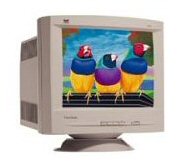
ViewSonic A75s CRT Monitor
This is my wifes monitor.
| CRT |
Type |
17" (16.0" viewable) CRT |
| Dot Pitch |
0.24mm horizontal, 0.27mm diagonal |
| Phosphor |
RGB medium persistence |
| Glass Surface |
Tint (TM=46%) ARAG® screen treatment |
| INPUT SIGNAL |
Video |
RGB analog (75 ohms, 0.714 Vp-p) |
| Sync |
H/V separated (TTL), composite, sync-on-green |
| Frequency |
f h: 30~70kHz; f v: 50~180Hz |
| COMPATIBILITY |
PC |
IBM® XT, AT, 386, 486, Pentium® PS/2 and compatibles (from VGA up to 1280x1024 non-interlaced) |
| Mac®* |
Power MacTM up to 1024x768 |
| CONNECTOR |
Signal |
15-pin mini D-sub [attached] |
| Power |
3-pin plug (ICE3200) |
| POWER |
Voltage |
AC 90-132V/198-264VAC (auto switch) 50/60 (+/-3)Hz |
| Consumption |
90W (typ) |
| CONTROLS |
Basic |
Power on/off, Key-1, Key-2, down, up |
| On View® |
Contrast, brightness, H/V-position, H/V-size, pincushion, degauss, pin-balance, trapezoid, parallelogram, tilt, ViewMeter® language select, ViewMatch® color, moire recall |
| VIDEO INPUT |
Bandwidth |
110MHz |
| MISCONVERGENCE |
|
0.3mm (max) at center
0.4mm (max) at corner |
| DISPLAY AREA |
Factory Setting |
300mm(H) x 225mm(V) |
| Maximum Scan |
325.8mm(H) x 243mm(V) |
| OPERATING CONDITIONS |
Temperature |
32°F to 104°F (0°C to 40°C) |
| Humidity |
5% to 95% (non-condensing) |
DIMENSIONS
(WxHxD) |
Physical |
420mm (W) x 436mm (H) x 385mm (D) 16.5" x 17.2" x 15.2" |
| WEIGHT |
Net |
35.3lbs (16.0kgs) |
| WARRANTY |
|
Three-year limited warranty on CRT, parts and labor. Optional Express Exchange® service program available |
| POWER MANAGEMENT |
|
Meets ENERGY STAR®, VESA® DPMSTM standards |
| REGULATIONS |
|
UL, DHHS, FCC-B, DOC-B, ISO9241-3, CE, CB, MPR-II, EPA |
Gateway FDP1830 LCD Monitor
| Gateway FDP1830 LCD Monitor |
This was a gift from Danny.

| Feature |
Specification |
| Brightness |
200 candelas per square meter (minimum)
250 candelas per square meter (typical) |
| Contrast Ratio |
350:1 (typical) |
| Resolution Range |
640 × 480 to 1,280 × 1,024 |
| Response Times |
30 mSec (rise + fall typical) |
| Viewing Angles |
Vertical: 160°
Horizontal: 160° |
| Number of Colors |
16.7 million (8-bit) |
| Default Color Temperature |
6,500° Kelvin |
| Color Coordinates of White |
x = 0.313, y = 0.329 |
| Viewable Display Area |
359.04 × 287.232 mm (H × V) |
| Pixel Pitch |
0.2805 × 0.2805 mm |
| Native Pixel Format |
1,280 × 1,024 (H × V), RGB vertical stripe |
| Synchronization Range |
fH: 30 to 83 kHz
fV: 50 to 75Hz |
| Display Mode |
Normally black |
| Viewing Angle Technology |
Optical compensation film |
| Backlights |
6 CCFL bulbs |
| Panel Surface Treatment |
Anti-glare (polarizer), hard coating (3H) |
| Interface / Scaler |
LVDS 2ch / gm5020 (Genesis) |
| Input Connectors |
15-pin mini d-sub analog VGA, DVI-D |
| Controls |
Power On/Off, OSD control buttons (up, down, left and right), Auto/Set |
| Tilt |
30° up
5° down |
| Voltage Range |
90 to 264 VAC, 50/60 Hz |
| Power Saving |
2 W DPMS Off state |
| Power Consumption |
55 W maximum |
| Regulations |
UL, CSA, FCC, NOM |
| Dimensions (Net) |
428.8 × 205.8 × 424.5 mm (W × D × H) |
| Weight |
Unpackaged: 7.5 kg (16.52 lbs)
Packaged: 9.3 kg (20.49 lbs) |
IBM ThinkVision L171 17" LCD Monitor
| IBM ThinkVision L171 17" LCD Monitor |
The ThinkVision L171 monitor has an ultra slim bezel design that saves space.
The L171 design includes attach points which allows attachment of the optional ThinkVision USB Soundbar.
The ThinkVision L171 is in the Essential category of the ThinkVision family of monitors. It is best suited
for general business applications such as word processing, spreadsheets, and business graphics.
 The new Lenovo ThinkVision L171 LCD monitor offers:
- Viewable image size: 17 inch (432 mm)
- Brightness: 300 cd/m2 (typical)
- Contrast ratio: 700:1 (typical)
- Viewing angles
- Horizontal: 140°
- Vertical: 135°
- Response time: 5 ms (typical)
- Display native resolution of 1280 x 1024 (automatically scales lower resolution to fill the screen)
- Tilt stand
- Direct access for automatic image setup and brightness
- Analog input (15-pin D)
- Internal power
- 100 mm Video Electronic Standards Association (VESA) standard for mounting
- EPEAT (Electronic Product Environmental Assessment Tool) Silver certified
- Kensington lock compatible
Features and benefits
- 17 inch (432 mm) viewable image size
- Native resolution of 1280 x 1024
- Slim bezel saves space
- Adjustable tilt stand for viewing comfort
- Direct access for automatic image setup, brightness, and easy monitor setup
- Attachment points for optional ThinkVision USB Soundbar (40Y7616)
- Analog video connection
- Internal power
- Kensington lock slot
- EPEAT Silver certified
- Meets 100 mm VESA standard for mounting
- Detachable stand for wall or arm mounting (sold separately)
- Available in business black
|
The L171 LCD monitor is intended to operate with system units or video adapters that generate a video output signal falling within the L171 specification:
- Maximum addressability (pixels) 1280 x 1024
- Maximum pixel rate (MHz) 140
The L171 LCD monitor supports VESA Standard Timings as detailed in "Display Monitor Timing Specification," Version 1.0, Revision 0.8, dated September 17, 1998, for the following modes:
- VGA: 640 x 480 at 60, 66, 72, and 75 Hz
- SVGA: 800 x 600 at 60, 72, and 75 Hz
- XGA: 1024 x 768 at 60, 70, and 75 Hz
- SXGA: 1280 x 1074 at 60, 70, and 75 Hz
The L171 LCD monitor also supports the following modes:
- 640 x 350 at 70 Hz
- 720 x 400 at 70 Hz
- 1280 x 1024 at 76 Hz
National language support is a function of the video adapter in the system unit and the application or support software.
Note: The L171 LCD monitor features factory-preset display modes. The actual display modes used depend on the attaching system unit, the operating system, and application software.
|
|
|
ViewSonic VA520 LCD
This was the first LCD monitor that I owned. They had a special on them at
Fry's and I bought one... before I knew what to look for. It is still a good little monitor for
trouble shooting and testing.

| 15" TFT LCD DISPLAY |
| LCD | Type | TFT active matrix |
| Display Area | 12.0" (horizontal), 9.0" (vertical); 15.0" diagonal |
| Brightness | 250 cd/m2 (typ) |
| Contrast Ratio | 300:1 (typ) |
| Viewing Angles | 120° horizontal, 110° vertical (typ) |
| Light Source | Long life, 50,000 hrs. (typ) |
| Panel Surface | Anti-glare |
| Response Time | 25ms |
| Dot Pitch | ???? |
| VIDEO INPUT | Analog | RGB Analog (75 ohms, 0.7/1.0 Vp-p) |
| Frequency | Fh: 30~62kHz; Fv: 50~75Hz |
| Sync | H/V separated (TTL) |
| COMPATIBILITY | PC | VGA up to 1024x768 non-interlaced |
| Mac®** | Power MacTM up to 1024X768 |
| CONNECTOR | Analog | 15-pin mini D-sub |
| Power | AC in,AC to head |
| POWER | Voltage | AC 100-240V (universal) via external DC converter brick |
| Consumption | 30W (max) |
| CONTROLS | Basic
OnView® |
Power (soft), 1, down, up, 2
Contrast, brightness, auto image adjust, H. position,
V. position, H. size, color adjust (9300K, 6500K/default,
user), sharpness, fine tune, information, OSD position,
OSD timeout, resolution notice, OSD background
(on/off), language, recall |
OPERATING
CONDITIONS | Temperature
Humidity | 32-104°F (0-40°C)
10-90% (non-condensing) |
DIMENSIONS
(WxHxD) | Physical | 356mm (W) x 344mm (H) x 200mm (D)
14.0" x 13.5" x 7.9" |
| WEIGHT | Net | 8.1 lbs. (3.7 kgs) |
Logisys PC extension station
For lack of a better place, at the moment, I am placing this here, since my
Monitor sits on top of it anyway,
Techgage
has a good write-up on it. I will only repeat some of the info here.(
As it turns out ... none.)
They have a lot of pics so you might want to drop over to their site. Now then, I had some minor problems
with mine when I recieved it. Plugged it in, plugged in my System Components, hit the Master switch annnddd...
nothing. So, I disconnected everything, scoped out the wiring, found nothing, and then hooked it back up.
This time it worked!! And has been ever since. There have been a couple other minor probs. Once when I turned
off the Master Switch, the rest stayed on! I had had my System on for days. I actually don't remember what
was done to correct it, but it is working properly now. Well, I think so. May be producing a Motor Boat in
my speakers. Haven't done all the checking yet, but I will and hopefully will remember to put the results here.
I do need to say that it is a nice setup -but- even though it looks good, it seems like it was made in
someone's garage. The outlets on the back are not secure. You wouldn't want to plug and uplug into them
very much. Then there is the USB panel on the front. It is to be held in by two screws. One was missing and
the other is really to short and keeps falling out. -But- even with these, I still like it and I think it
is a good base for a tinkerer. A normal person may want to think twice.
I did make one modification to it. I drilled holes and installed to small
screws at the back for my monitor. I was worried about it sliding off. If you look at the Sony Monitors,
and some others that have the fold out stand, they can get jarred or accidentally pushed back and there
is nothing to stop them from crashing to the desk, UNLESS you are close to a wall, -OR- you put in stopper
screws like I did. These were little number 2 screws but they do the Job. JFYI.

Specs copied from OutletPC and they
are selling them at a good price. You might check them out if you are interested.
Key Selling
Points: Save space on your desktop while adding tons of features with
this PC Extension Station from Logisys! Featuring five power switches on
the front which control up to five different electronic devices (such as
your monitor, PC, speakers, printer, etc.), this station makes it easy
to turn off and on your devices every day, and provides fuse protection
in case of over-voltage or over-current. It also includes four USB ports
on the front of the station for easy access - no need to struggle to
plug in a USB device in the back of your computer. Plus,
it can support up to
50 lb monitors, so it's great for either your LCD or CRT monitors!
Specifications:
- Model: Logisys Power Center & Monitor Stand w/ 4-Port USB Hub
- Item No: C6871
- General Features:
• Clear stand
• Monitor stand supports up to 50lbs
• Keyboard slot below stores keyboard and saves space
• Five individual power switches lets you control power to each device
• Master power switch powers or shuts down all devices
• 4 frontside USB ports for easy access
• USB hub plugs into one single USB port on your computer
• 3.5" storage bay
• Includes 3.5" storage bay
- Dimensions:
• 21" x 9.5" x 4.5" (L x W x H, approximate)
- Retail Package Includes:
• PC Extension Station
• Power Cord
• Attached 4ft USB Cable
Compatibility: Monitors up to 50lbs; Available USB Port; Power
Outlet
Condition: New (RETAIL) |
Cleaning an LCD and an LCD Touch Screen
The following was borrowed/stolen from:
How to Clean Touch Screen Monitors at eHow.com
- Well, I must change the first step slightly since we may not be dealing with a monitor. These steps would
also apply to an LCD TV and a Touch Screen Remote and an iPod and... and... etc. In otherwords all LCD
screens. Now most, if not all, TV and Monitor screens have an On/Off button. However, most of the Remotes
do not have an On/Off button... for themselves. Therefore, we need to turn them over and remove the
battery. Afterwards you will be able to safely clean the screen. Just properly remove the power on whatever
device you are cleaning.
- Next, wet a soft, lint-free or microfiber cloth with distilled water. Wring out as much water as you can.
Make sure the cloth is damp but not wet. Wipe the screen in a gentle motion to remove dust, oil, or
fingerprint smudges off.
- Another option is to use a screen cleaner kit that includes antistatic wipes. You can buy this at
various electronic or online stores. Spray a little solution on a wipe then rub it gently across the
screen.(Wal-Mart sells it. I work there.)
- Finish cleaning the touch screen with a dry lint-free cloth to wipe away any excess moisture, then turn it
back on... or re-install the battery.
Copyright © 2004-2010
All rights reserved.
|



