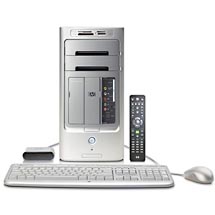
HP m7480n Machine
Specs:
The following table was extracted
from the Intel literature. You can click on some of the
headings and get more info... as of 13 Mar 09... Since it
is Intel's, and I don't have a copy of the info you are
taking pot luck as to whether or not it is there.
Still to do:
| VNC - Windows |
VNC - Linux |
|
|
Intro - 25 Jan 07
I was lucky enough, a couple of
days ago, to just be talking to my wife at the right time
and she said I could get a new PC. WOW!! I really wanted
annnnd ... somewhat needed a new one...but was afraid to
ask. With my new ventures into Virtual Machines I needed
more disk space and more RAM. The RAM in my present
machine, DIMM SDRAM, is getting difficult to find and the
cost is going up. The hard drive is another expense. In
addition, I just received as a present, Real Flight G3, an
RC flight simulator and my current graphics card is not
powerful enough to handle everything. My daughter has the
first HP that I ever purchased and it is way out of date.
My current one is way more than she needs but, she will
get it. So, we both will get "new" PC's, so to speak. I
haven't even gotten my new one yet and I am already
writting this up.  The biggest problem is ... I am only guessing at the model
number. It wasn't specified and to small in the picture to
figure it out. Seems they had a number of PC's with 7360
in them... which is what this appears to be. It was
ordered today. (Nope. Found out that it
is a 7480.)
The biggest problem is ... I am only guessing at the model
number. It wasn't specified and to small in the picture to
figure it out. Seems they had a number of PC's with 7360
in them... which is what this appears to be. It was
ordered today. (Nope. Found out that it
is a 7480.)
One reason for starting this
early is so that I can document everything that I must do
and am going to do. The one saving grace is that I will
get it with a Windows XP and NOT that new Vista crap.(hope
that if/when I eat my words they taste good) This
will be a big change for me anyway. I have one of the
original versions of Windows XP and ... I have not been
getting all of their updates. I believe that a lot of them
were just as intrusive as they were helpful, if you can
call them that. I am a strong believer in, "If it ain't
broke don't fix it." I'm sure this version that is comming
with this PC will have a lot/all of those updates. But
then I dual-boot with SuSE Linux and spend most of my time
in Linux. Ceptin for these WebPages which I do inside
HomeSite, inside Win2K, inside VMware, inside Linux.
Hmmmmmmm.... this is gona be a lot of work!!
First things first
Thanks
to the Lord. He gave me another Super Computer.
Only this one is really Super!! One and a half times the
speed, better video and lots, lots more RAM. AND ... at
only half the cost!!
Praise the Lord ... my God ... and Savior.
(8)
Owe no man any thing, but to love one another: for he
that loveth another hath fulfilled the law.
(9) For this, Thou shalt not commit adultery, Thou shalt
not kill, Thou shalt not steal, Thou shalt not bear
false witness, Thou shalt not covet; and if there be any
other commandment, it is briefly comprehended in this
saying, namely, Thou shalt love thy neighbour as
thyself.
(10) Love worketh no ill to his neighbour:
therefore ... love ... is the
fulfilling of the law.
Romans 13:8-10
Now we need to back up all that I
haven't been backing up. Like everyone else I have been
letting my back ups slip away a little. So now I need to
move everything that I created, or saved, out to a DVD
disc so that I can transfer all this to the new PC. Hope
that it, the new 7480, is as well made as this one, the
9995, was. It has served me faithfully since December of
2001. Now here it is almost February of 2007. That is a
little over 5 years.
Jump or Flash Drive
Now what is this doing in here??
I just got one. Again I have had the desire but not the
need. Well, the need just came into being. One of my
co-workers got a terrible virus on her PC. She wanted to
save some new music files and some pictures and her
favorites. Unfortunately, she does not have a writeable CD
or DVD on her system. In the past, while working on her
PC, I had connected to my Network, transferred the files
to my PC and then wrote them out to a CD. Well this time I
didn't want to connect her PC to my Network. So I got the
Jump Drive and copied what she wanted to keep over to it.
Then after restoring her system I copied her stuff from
the Jump Drive back to her PC. You can perform wonders
with 4GB of storage. My very first Hard Drive didn't even
have that much space!!
It arrived - 30 Jan 07
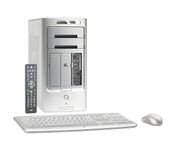 |
A PC is a PC. Not if it's the Pavilion Media
Center m7480n Desktop PC. It's also a TV. The
built-in TV Tuner and Personal Video Recorder (PVR)
let you watch, pause, rewind, and record live
television on your Media Center PC. You can store up
to 176 hours of Digital video on the 300GB hard
drive. An online Electronic Program Guide (EPG) lets
you review the TV schedule and select individual
episodes or entire series, so you can watch your
favorite shows on your own time, at your own
convenience. |
| There is more: Has a slot for a
removable Hard Drive. Has a remote control for the
TV tuner. Slots for SD Mem Sticks. Don't know if I
ever will get to use everything!!
Refer: Raoulpop.com |
April
12th, 2013 / 6:27am Wish that we had been
'wise' enough to enter dates and times from the beginning.
Would have made a lot of sense on some of this. -But- we
are now so, here it is. As stated below, the UPS Truck
arrived and they 'usually' come between 2 and 3:00 in the
afternoon. So, that is as close as we can get to a time.
The date is stated above.
Sitting watching TV and up drives
the UPS truck. Yahooo!! My new PC arrived. But I have a
problem. It is heavy and I am not allowed to lift anything
over 5lbs. I just had open heart surgery in December. So
my wife helped me move it to the family room. She slipped
it up on the couch and we opened the box. Looks like
everything is there. Then we just parked on the floor
between the TV and my desk while I decided what to do.
Later after she laid down for a nap, I got my next door
neighbor to put it up on my bench the the Hobby room. I'll
get it setup, working and tested out before I replace old
faithful, the 9995, on my desk. Besides I can plug it into
my Network and transfer a lot of stuff that way. Beats the
heck out of sneaker net.
I desparately want to just hook
things up, plug it in and go BUT I want to write this up
so that anyone else can benefit, or not, and for my own
record. Besides I have to go to work. Then tomorrow I must
set up Danny with the upgrade to Real Flight. And I must
deliver the re-loaded PC back to my co-worker. This whole
page will concern setting this up ... Hardware, Windows
and Linux.
Has Asus MotherBoard
P5LP-LE -- The 600GB HDD is really two 300GB's
Initial Setup
Monitor
Ok. It, the 7480, is nicely
packed. Keyboard is in one flat box, the mouse, cables and
wireless receiver are in another box. My monitor plugs
into the the VGA port on the NVIDIA GeForce 7300
LE TurboCache card. There are also S-Video and
Composit Video outputs. I'm initially using my smaller 15
inch ViewSonic VA520 LCD display on the
New PC for this setup. It is looking the best it has
looked. Not sure how much of that is biased cause I know
it is a new PC and a better grapics card ... or it really
is.?.
Video Card

NVIDIA® GeForce® 7300 graphics processing
units (GPUs) allow you to experience the latest gaming
effects without compromising performance. Boasting the
3D graphics features of today's most advanced
GPUs-including full support for Microsoft® DirectX® 9.0
Shader Model 3.0 and true high dynamic-range (HDR)
lighting-GeForce 7300 GPUs also bring stunning, high
definition video and superb picture clarity with minimal
CPU usage with NVIDIA® PureVideoTM
technology. For the performance and features you need to
play the latest games and enjoy home-theater quality
video, make sure your PC is equipped with a GeForce 7300
GPU.
Refer:
nVidia
NVIDIA GeForce 7300 LE
TurboCache I'm disappointed!! My older system
containing a GeForce 2 had faster graphics than this new
fancy dancy dual core, 2 GB one! The only thing that is
really noticeably faster is the damn mouse. And it is to
fast! The movements are to jerky.
Uncle:My apologies to the
HP team. The display problem is in Linux mode. I just
switched over to WinXP and the display was fast. Can't
really say that it is exceptionally faster than my old one
but in WinXP it is acceptable. I will have to see what it
looks like on my 19 inch Sony ... soon.
Ok. So we will try to get new
drivers from nVidia and see if that will fix it.
- One driver for all products
- There is one single NVIDIA Driver for all our
products. To select your download:
- (a) if you have a GeForce, Quadro, TNT2 or RIVA,
click on Graphics Driver and select your product and
Operating System, else
- (b) if you have an nForce Motherboard, click on
Platform / nForce Drivers, select your nForce
product and choose your Operating System.
- European users: please download the
"International" version (where available) of the
NVIDIA Driver.
Windows XP/2000 32-bit:
93.71_forceware_winxp2k_english_whql.exe
Version: 93.71
Release Date: 2.11.2006
WHQL Certified
Linux Display Driver - x86:
NVIDIA-Linux-x86-1.0-9746-pkg1.run
Version: 1.0-9746
Operating System: Linux x86
Release Date: 21.12.2006
Allllrighty Now... I have SuSE
Linux and there are special instructions for setting up
the nVidia drivers. You can do it through YAST.
I decided to do it that way. It not only installed the new
drivers but also created a new kernel, a
2.6.18.2-34-bigsmp one. (saved the page, just in case) The
new drivers definately help the Linux ops. (
SMP )
I installed the Windows driver
and because it was so good already I'm not sure how much
it was improved. I read a complaint about this graphics
unit on the Web. The person said that there were some
frame delays in Call of Duty. I don't have or play the
game, so I can not verify, or deny, that complaint. I will
have to compare the usage of my new G3 flight simulator. I
think it looks better ... but ...
Q: What is the physical memory
for the GeForce 7300 LE?
You will see a lot of GeForce 7300 LE-based cards with
128MB of on-board memory, supporting 256MB of memory in a
512MB system. You will also see GeForce 7300 LE-based
cards with 256MB of on-board memory that support 512MB of
memory in a 1GB system.
Q: What kind of memory is on the
GeForce 7300 LE card?
A: DDR2 memory.
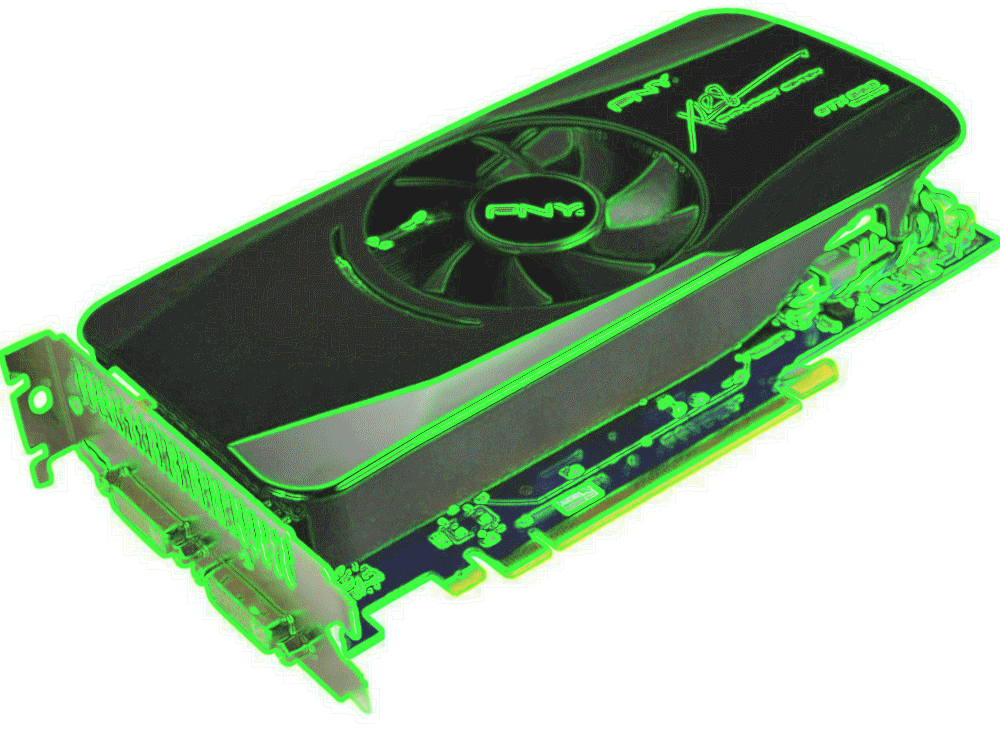
GeForce GTX 560 - Final Replacement
Added October 8th, 2013 TRComputing
 |
GTX 560 |
 |
| Description |
Full Microsoft DirectX 11 supportNVIDIA CUDA technology supportDirectCompute 5.0 supportOpenCL supportNVIDIA PhysX technologyNVIDIA 3D Vision Surround readyNVIDIA PureVideo HD technologyDual-Link HDCP-capableOpenGL 4.1 support
|
| Product Identifiers |
| Brand | PNY |
| Product Line | PNY |
| Model | GeForce GTX 560 |
| MPN | VCGGTX560XPB |
| UPC | 0751492505862, 751492505862 |
|
| Main Specifications |
| Type | Graphics adapter |
| Enclosure Type | Plug-in card |
| Interface | PCI Express x16 |
| Graphics Processor | NVIDIA GeForce GTX 560 |
| Clock Speed | 810 MHz |
| API Supported | DirectCompute 5.0, DirectX 11, OpenCL |
| Memory Size | 1 GB |
| Max Resolution | 2560 x 1600 |
| HDCP compatible | Yes |
| Compatibility | PC |
| | Processor | | Graphics Processor Manufacturer | NVIDIA |
| Graphics Processor Data Width | 256-bit |
| | Memory |
| Memory Technology | GDDR5 SDRAM |
|
| Expansion / Connectivity |
| Compatible Slots | PCI Express 2.0 x16 |
| Connectivity Interfaces | DVI-I (dual link) x 2 |
|
| Video Output |
| Digital Video Standard | Digital Visual Interface (DVI), High-Definition Multimedia Interface (HDMI) |
| Multiple Monitors Support | Yes |
|
| Video Input |
| Input Type | None |
|
|
October 14th, 2013 / 11:51am Here it is days later and we have finally gotten
somewhere on this card. It is working ok -but- it starts up with a racket!! The fan. Fortunately, after 5 minutes or so it
quiets down. Then upon investingating on the Web, it appears to be a common problem. Not good news. We will investigate it
further but for now we are just going to be using it.
October 16th, 2013 / 6:04am Well... we just had our first 'LockUp' with our
'Newest' setup. Annnddd... the damn fan is making more noise now.
October 25th, 2013 / 8:56am
Allllllrighty now... We have a fix!! As it turns out, our
lockups were primarily, -and- probably only, in Windows under VMware
under Linux. It seems that most, if not all, of our problems have been since we switched to 64-bit mode.
Seems that the Linux gurus decided to enable the watchdog interrupt on the 64-bit systems. This caused
problems when running VMware. Suffice it to say, IF you want
smooth and proper operation of VMware, you have to disable this
NMI interrupt. Refer: Linux NMIs on Intel 64-bit Hardware
Possible Replacement #2 - Not only possible, We Did. Aug 22nd, 2013 / 8:55am

The NVIDIA® SLITM-Ready GeForce® 7600 graphics processing units (GPUs) unleash extreme HD gaming and video on the PC.
Featuring the award-winning GeForce 7 Series architecture, the GeForce 7600 GPUs deliver smooth, realistic gaming at
ultra-high resolutions. Additionally, the GeForce 7600 GPUs bring high-definition, home-theater quality video to the
PC through the acclaimed NVIDIA® PureVideoTM technology.
Wow! That
is all we can say. As stated, in the previous replacement
context, we have been having problems with our Video
Card causing freezes of our system... requiring a PowerOff
reset. The previous card DID NOT correct the problem and
it was returned before the 'In Store Warranty' of 14 days
was up.
Once again we are going to
change our Video Card. This time we are going to use the
card from our wife's machine. She has become a heavy Gamer
and is needing a better card. Hers is already much better
than ours so, it will come to our machine.
Possible Problem Now
then, our card is a 7300LE
and hers is a 7600GT.
They BOTH use the 'same' driver from nVidia.
The GeForce
7 Series. These are in the Legacy category.
Extreme
PSU Calculator
PSU 430W
+3.3V@20A, +5V@20A, +12V@32A, -12V@0.8A, +5VSB@3A
Jonnyguru PSU FAQ
From the Jonnyguru PSU FAQ
- The 6+2-pin, or 8-pin, PCIe power connector.
- High end PCI Express (PCIe) graphics cards often need
auxillary power. This power is delivered to the card via
either a 6-pin PCIe connector or a 6-pin and 8-pin power
connector.
PCI Express graphics cards without any kind of auxillary
power connector are called "75W cards" because 75W is
the most power the card can pull from the PCI Express
slot. A graphics card with one 6-pin PCIe power
connector is called a "150W card" because the 6-pin
allows the card to draw up to 150W of power. A graphics
card with two 6-pin PCIe power connectors is called a
"225W card" and a graphics card with one 6-pin PCIe and
one 8-pin PCIe power connector is called a "300W card"
BFG power supplies use what is referred to as a
"6+2-pin" PCIe power connector. This is because the
power connectors have a removable pair of pins that
converts an 8-pin PCIe connector into a 6-pin PCIe power
connector.
Some calulations August
23rd, 2013 / 1:53pm Antec 650 watt TP3
PSU - three rails, each providing a max of 19 amps. But
the total 12 volt output is 52 amps.
19x3 = 57x0.85 = 48.45 ...
Open
GL Capabilities
Possible Replacement - Not only possible,
We Did.
January 11th, 2013 /
11:37pm We possibly might need to obtain a
new video card. It appears that nVidia
is no longer supporting the GeForce 7 series. And we are
having troubles with the current Driver, 304.64, in/on our
Linux System.
Q:Can a
DDR3 graphics card run in a DDR2 Motherboard?
A:Yes. The DDR3 memory is
on the video card, it doesn't matter if your motherboard
supports DDR2. The memory controller is on the video card
to support DDR3. The DDR2 memory controller is on your
motherboard. They're separate and not related for the
purposes that we're seeking.
Just make sure it's either AGP or PCI
Express x16, and that the video card and
motherboard match, agp to agp or pci express x16 to pci
express x16. Also make sure your Power
Supply is large enough.
(copied and modified from Yahoo! answers)
August 20th, 2013 /
6:43am Nova GPU Chart
| GPU Name |
Avg. FPS |
Sample Size |
| NVIDIA GeForce GTX 560 |
551 |
2462 |
| NVIDIA GeForce 9800 GT |
196 |
3230 |
| NVIDIA GeForce 7600 GT |
66 |
720 |
| NVIDIA GeForce 210 |
49 |
2251 |
| NVIDIA GeForce 7300 LE |
12 |
511 |
| | |
CPU Name                  Avg. Score   Avg. MHz   Sample Size
Intel Pentium D 3.20GHz       156        3381         477
Intel Core 2 Duo              181        2297        57673
Power
Supply Info -
Power Requirements -
ATX PSU Maximum Combined 12v
Ratings
Correct way of calculating??
sum them up and multiply by 80% -- Comb Amps for 12v
supplies... ballpark figure.
From a: Forum
If we take Be-quiet Straightpower 550W as an example. It
has the following spec:
+3.3V +5V +12V1 +12V2 +12V3 +12V4 -12V +5vsb
32A 30A 18A 18A 18A 18A 0,5A 3A
Total comibined output on +12V: 41A (492W) = The PSU's
maximum capabiliy on +12V
On each rail on +12V we are allowed to draw 18A according
to the spec. A theoretical maximum output of 4*18A = 72A
(864W). But 864W is more than the PSU's total output of
the psu (550W) and even more than the psu's capability on
+12V, 41A (492W).
4*18A = 72A only tells us we are allowed to draw maximum
of 18A on each of the four rails on +12V, but not on all
of the rails at the same time. The maximum we can draw
from +12V at the same time is 41A (492W).
The gap between the theoretical output on +12V of 72A
(864W) and the capability of 41A (492W), is the headroom
the spec gives us to use "unused amps" on one rail on
+12V, on another rail on +12V.
In reality, the gap is bigger, all psu's with a specified
maximum output of 18A on the rails, have an OCP which will
shut the psu off if the draw from one of the rails on +12V
exceeds 20, 22 or even 25A.
The OCP's are always programmed to shut the psu off at a
higher current than specified on the label, no matter what
is printed on the label. Reply With Quote
Request #25514 "Hello, We proudly pos..." created
New GeForce 210 Card - Thursday April 11th, 2013 /
3:43pm
Refer:
nVidia -
PSU Requirements -
PassMark Card Compare -
WiKi nVidia
'The
Fix' After installation of this card, the
onboard Realtek audio, for our sound system, disappeared.
The solution, which
the 'Lord' directed us to, was to go to the BIOS
and Permanently Enable the Onboard Audio. It 'was' set to
'Auto'. Changed it to:
F2 on reboot, Advanced -->
Onboard Audio --> Enable
Refer: GeForce Dev and Video Card Benchmarks
The problem was:
an NVIDIA
High Definition Audio Driver
Four copies of it. Need to learn more about it -but- it is
not important -cause- we don't have any use for it now,
nor in the fore-see-able future. In the following,
'Included' means that they came with the System.
The real problem was/is we
experienced that 'same' problem with this card as our
original. It locked up!! So we returned it and are back to
our 'old' card.
					      GeForce 210 Specifications

						 GPU Engine Specs
CUDA Cores:                             16
Graphics Clock (MHz):                   589MHz
Processor Clock (MHz):                  1402MHz
 Memory Specs
Memory Clock:                           500MHz
Standard Memory Config:                 512MB
Memory Interface:                       GDDR2
Memory Interface Width:                 64-bit
Memory Bandwidth (GB/sec):              8.0
 Feature Support
OpenGL:                                 3.1
Bus Support:                            PCI-E 2.0
Supported Technologies:                 CUDA
 Display Support
Multi Monitor:                          Yes
Maximum Digital Resolution:             2560x1600
Maximum VGA Resolution:                 2048x1536
Standard Display Connectors:            DVI
                                        VGA
                                        DisplayPort
HDMI:                                   Yes
 Standard Graphics Card Dimensions
Length:                                 6.60 inches
Height:                                 2.731 inches
Width:                                  Single-slot
 Thermal and Power Specs
Maximum GPU Temperature (in C):         105 C
Maximum Graphics Card Power (W):        30.5 W
Minimum System Power Requirement (W):   300 W
 Legacy Specs
Audio Input for HDMI:                   Internal
Keyboard and Mouse
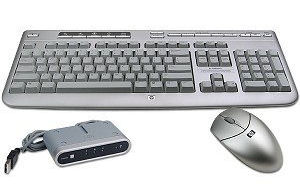
Both of these are wireless. Now
that sounds good BUT may not be. I have Carpal Tunnel and
found that the only keyboard I can use is an
OmniKey/Ultra. This was produced by the now defunct
Northgate Computer Co. I have tried the keyboards that
came with other PCs and I couldn't use them. What I
learned from a good friend and co-worker when I worked at
Honeywell was ... it is not just the downward pressure but
also the up-stroke that causes the problems. I obtained
two of these KB's then and had one at home and one at
work. They didn't cure me but they did allow me to
continue to work in this field and not experience all that
pain. My arms were hurting so bad that it hurt just to put
my hands in my pockets! Anyone who has experienced this
will probably know what I am saying. If you haven't then
you won't and I hope you never do.
Anyway, there is a receiver that
must be plugged in for these to work. The receiver and
mouse are packed together. The receiver gets plugged into
a USB port. I used one on the back.
Linux: Initial scare. During the
first part of the initialization I could not use the ESC
key to display the verbiage. Later, I presume after the
USB code got loaded, I got some valid responses from the
KB entries.
Note: A complaint on the
KB and Mouse. So far the KB hasn't caused any hand or arm
problems. But, there are no lites for the Cap-Lock and
Num-Lock. Goes back to the old type-writer days. You have
to remember. As for the mouse, it seems to take to many
clicks to get an action performed annndd... it is way to
fast in Linux mode with no apparent way to slow it down!!
I'm sure there is ... I just haven't found it yet.
Correction:
There are indicators for Caps Lock, Scroll Lock and
Num Lock. They are on the receiver!!
Mouse:
Allllrighty Now. I took the time to investigate this
hi-speed mouse. Faster computer, faster graphics equals
faster mouse. In the Configure Desktop, Personal Settings
there is a Peripherals section. Inside the Periperals
section is a mouse section. Inside the Advanced section of
the mouse settings is a value field and a bunch of slider
buttons. The two most important ones are the Pointer
Acceleration and Pointer Threshold.
Pointer Acceleration allows you to change
the relationship between the distance that the mouse
pointer moves on the screen and the relative movement of
the physical device itself (which may be a mouse,
track-ball, or some other pointing device.)
A high value for the acceleration multiplier will lead to
large movements of the mouse pointer on the screen, even
when you only make a small movement with the physical
device.
Pointer Threshold is the smallest
distance that the mouse pointer must move on the screen
before acceleration has any effect. If the movement is
within the threshold, the mouse pointer moves as if the
acceleration were set to 1x.
Thus, when you make small movements with the physical
device (e.g. mouse), you still have fine control of the
mouse pointer on the screen, whereas larger movements of
the physical device will move the mouse pointer rapidly to
different areas on the screen.
====================
-
Resync the
keyboard and mouse connections .
Resynchronizing the keyboard and/or mouse causes the
devices to reconnect to the receiver using new
identification numbers. Use the following steps to
resync the devices:
|
NOTE:
|
The
following connection sequence must be
completed within 60 seconds. If the sequence
is not done in 60 seconds, start over. |
-
With the receiver
plugged in, press and hold the Connect
button on the receiver until the activity LED
flashes.
|
NOTE:
|
Some
HP computers have receivers built into
the front of the computer; such as
TouchSmart 700 Series PCs and Digital
Entertainment Centers. Look for a small
connect button built into the case. If
you have a TouchSmart 500 or 800 Series
PC, the receiver plugs into a USB port
on the underside of the case and does
not have a connect button - skip this
step. |
Figure 4: An
example of a receiver
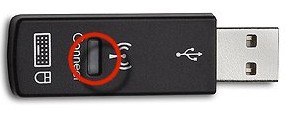
1
- Connect button and LED activity light
Figure 5:
Another example of a receiver
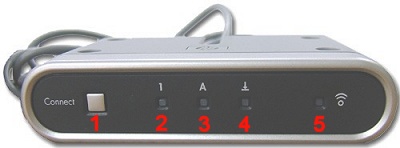
1
- Connect button
2
- Num Lock LED
3
- Alpha Lock LED
4
- Scroll Lock LED
5
- Activity LED
-
Press and hold the
recessed connect button on the underside of the
keyboard until the activity light on the receiver
stops flashing. When you release the button, make
sure it does not stick in the depressed position.
|
NOTE:
|
If
problems persist after resetting AND
there is another wireless keyboard or
mouse near, use these steps again,
holding down the keyboard or mouse
button for ten seconds. Doing so may
give the keyboard or mouse a new ID
number in case the other keyboard or
mouse was using the same number. |
-
Press the Connect
button on the receiver again until the activity
light flashes.
-
Press and hold the
recessed button on the underside of the mouse
until the activity light on the receiver stops
flashing. Make sure the connect button does not
stick in the depressed position.
-
If your mouse and keyboard
have a USB receiver, unplug the USB receiver,
wait 10 seconds, and then insert into another USB
port - preferably into a USB port that is
closer to the mouse and keyboard. For example, if the
USB receiver was plugged into a USB port on the back
of the computer, unplug it and plug it into a front
USB port.
| Features/Specifications:
|
- HP/Compaq 5187URF2+
Wireless Keyboard and Optical Mouse
- General Features:
- Silver color with black
accents
- Wireless freedom
- USB receiver
- 49 MHz wireless performance
- Keyboard Features:
- Wireless
- Operates on two (2) AA
batteries (not included)
- Adjustable feet
- Five (5) Hot keys (Search,
Q Club, Internet, Info, E-mail)
- Ten (10) MultiMedia keys
(Eject 1, Eject 2, Burn CD/DVD, Prev,
Play/Pause, Next, Stop, Volume up, Volume
down, Mute)
- Integrated key pad
- Sleep key
- Mouse Features:
- Wireless
- Optical technology
- Operates on two (2) AA
batteries (not included)
- 3-buttons (scroll wheel
acts as third button)
- Regulatory
Approvals:
- FCC
- cULus
|
| Package
Includes: |
- HP/Compaq 5187URF2+
Wireless Keyboard
- HP/Compaq 5187URF2+
Wireless Optical Mouse
- HP/Compaq 5187URF2+ USB
Wireless receiver
|
| Additional
Information: |
- Notes:
- Model: 5187URF2+
- Keyboard P/N: 5188-3564
- Mouse P/N: 5188-3582
- Receiver P/N: 5188-3583
- Product
Requirements:
- Available USB port
- Four (4) AA batteries
|
Multimedia Video Controller
We copied this portion from our wife's
PC. Actually, all we wanted was the section before
the section that brought you here. We "Updated" her
Video card and then "Updated" ours with hers. Hers
went from a 7600GT to a 9800GT and ours went from a 7300LE
to the 7600GT.
WinTV v7 for use with the WinTV-HVR-1600
This download is a complete installation package,
including drivers for supported WinTV products plus the
WinTV v7 application and utilities.
Installation note:
A valid WinTV application CDROM will be needed to install
this WinTV v7 version. Any WinTV v6 or WinTV 7 application
CD can be used during the install. If you do not have your
original WinTV CD-ROM but would like to update to this
WinTV v7 version, you can purchase a new CD on the Hauppauge
webstore for $9.95 ... plus $2.95 for shipping.
Sound
The sound is Integrated Audio,
Realtek ALC882. I have a pair of amplifed speakers that I
usually use with the PC's I am fixing or with my shop PC.
I plugged those into the (green) Audio Output on the back.
Oooooops
No sound in Linux. I do believe that I had this problem
over on the 9995. I did. In version 9.2. Hmmmmm... further
examination shows that evidently the sound software never
got installed!! Nope, even further shows that it did.
But... an lsmod doesn't show any sound. In my last system
an lspci showed:
0000:00:1f.5 Multimedia audio
controller: Intel Corp. 82801BA/BAM AC'97 Audio (rev 12)
and in this one it shows:
00:1b.0 Audio device: Intel Corporation
82801G (ICH7 Family) High Definition Audio Controller (rev
01)
dusty-tr2:/home/ctaylor # modinfo
-p snd
major:Major # for sound driver.
cards_limit:Count of auto-loadable
soundcards.
Hmmmmmm... doesn't look like sound is running. So let's
start it.
dusty-tr2:/home/ctaylor # rcalsasound start
Starting sound driver
done
ctaylor@dusty-tr2:~> aplay
/usr/share/sounds/alsa/test.wav
ALSA lib confmisc.c:670:(snd_func_card_driver) cannot find
card '0'
ALSA lib conf.c:3500:(_snd_config_evaluate) function
snd_func_card_driver returned error: No such device
ALSA lib confmisc.c:391:(snd_func_concat) error evaluating
strings
ALSA lib conf.c:3500:(_snd_config_evaluate) function
snd_func_concat returned error: No such device
ALSA lib confmisc.c:1070:(snd_func_refer) error evaluating
name
ALSA lib conf.c:3500:(_snd_config_evaluate) function
snd_func_refer returned error: No such device
ALSA lib conf.c:3968:(snd_config_expand) Evaluate error:
No such device
ALSA lib pcm.c:2143:(snd_pcm_open_noupdate) Unknown PCM
default
aplay: main:550: audio open error: No such device
dusty-tr2:/home/ctaylor # rcalsasound status
ALSA sound driver not loaded.
unused
Sooooo... this shows I have no sound.
Well, I looked on the Web and
found that another person had problems with sound. It was
a review on SuSE
10.2 by Clement Lefebvre. He had problems with his
hardware getting setup. In the Hardware section of YAST,
it detected my sound chip but did not set it up. I had to
edit it and select 'automatic configuration'. Like Clement
I am at a loss as to why this was not done at install. At
anyrate, sound now works. Hmmmmmm... need to try a re-boot
and see if it still works.
Yep! Still works and works in VMware.
More on the sound. This involves
RealPlayer 10. I didn't have sound for the net. So I
installed RealPlayer ... as I have before ... but it came
out choppy. Through investigation on the net I found a
conversation on LinuxQuestions
which centered on this problem. One of the conversants
suggested this fix:
Start realplayer from the command line by doing "aoss
realplay", if the sound and video are not choppy, edit
your realplay executable and change
Code: $REALPLAYBIN "$@" to Code:
aoss $REALPLAYBIN "$@"
Now then, I don't know what "aoss" is, but I plan to find
out.
Ok. I found out: aoss is a simple
wrapper script which facilitates the use of the ALSA OSS
compatibility library. It just sets the appropriate
LD_PRELOAD path and then runs the command.
Also see: die.net
Network
Last but not least I plugged into
my Network through the Ethernet cable.
Ooooops
Problem with local net again in Linux. This is trying to
show my WebPages locally. I will have to setup the http
again is all that I think that it is.
Yep. Two fold problem. I had to
setup the http.conf file and I had to start apache. As
I've said before, things don't get started just cause you
installed them.
Problem at a later date. Could
not see dusty-tr2(Linux) from dusty3(VMware). Further
investigation showed that smb was running but NOT nmb.
Power Up
Whilst it was powering up I
extended the legs on the keyboard and accidently hit the
mute button. It either didn't do anything cause it was in
bring up mode or I just didn't press it all the way.
Either reason I still have sound.
Oooops
Problem in Linux mode. No sound.
Setup
At Power On, the first screen is
what HP recommends:
- Keep PC updated
- Learn about support tools
- Learn about HP Extened Service Plan
- Register with HP
- Select Browser
- Protect PC from Viruses and Spyware
The next few screens describe
these options and allow you to say yeah or neah to them.
For the first one, I allowed the updates. There was a
place to click on and view their Updates FAQ site and I
did. However, it did not show (or so I thought).
For the support tools you are to
click on the Help and Support icon. Also states there are
no recovery discs. HP creates a special recovery partition
at the front of the HDD. Your normal software and
operations can not read this partition. It can only be
read by the BIOS recovery section. I'm gona have to ask
for CD's from HP.
I don't believe that I want the
extended service. I rarely have problems with my HP's and
after all, I am supposed to be able to fix them. Which I
can for the most part. If I can't then I'll just have to
pay them to fix it ... if it is reasonable. If not I'll
just get another PC. If it is beyond what I can fix myself
then it will probably cost as much if not more than a new
PC. They have become throw away ... almost.
Now we have Register the new PC.
I selected later.
Browser choice ... I picked
Netscape 8 over Internet Explorer 6. They will load IE
anyway, I just chose Netscape so it will get loaded and be
my default choice. I'm gona install Firefox anyway.
Now they want to Protect my PC
... with Norton. Well, I don't want it. I prefer Avast!
from Alwil
Software. It is free for home use and the
Professional one is very inexpensive. I also use Ad-aware
from Lavasoft.
Both of these products have served me well. I have had
problems with both, Norton and McAfee.
Setup Finished
Allllrighty! Says I am finished
with setup. Hmmmmmm, how-bout-that, when the desktop
re-appeared the "Updatre from HP FAQs" is showing in MSIE.
So that means it got connected to my Network and went on
out to the HP site. Not sure if that is good or bad...?? I
bookmarked the HP Updates in IE 6.
By the By, the wireless mouse and
KB are working. I didn't have to do a thing. Well, I did
have to slow down the mouse movement. It was way to fast.
Recovery Discs!!
OH!! And hello. After closing
down the Update Window I got a Window that wants me to
create some recovery discs. I'm gona say "Yes" ... After I
check what kind of blank DVD's I got.
Well now, I have some DVD's that
my neighbor 'cross the street, Steve, had a problem with.
We both have had problems with different DVD's in our
original HP dvd100i writers. The "original" DVD'd that HP
created when they made these drives, worked great. The
engineers were told to create a drive that would create
DVD's that would work in any DVD player. They did. Even
though the original DVD's were DVD+RW's they worked in my
home DVD player. However, HP came out with some new ones
and they didn't work with my dvd100i drive. I couldn't
write to them. I had to get some DVD's made by Sony. These
DVD's from Steve are made by Memorex and they are DVD-R's.
The new LightScribe drive, which is in my new PC, is
supposed to be able to write to DVD+R, DVD+RW, DVD-R and
DVD-RW plus CD-R. I'm hoping that the LightScribe in this
new PC is better than the one I purchased and installed in
my old PC. I had lots of trouble creating CD's that would
work in my truck CD player and my "boom box".
I didn't get a chance to try
these DVD's from Steve in the LightScribe in my 9995 so, I
will try them on this one. Now this is the catch, you can
only create one set of recovery discs per PC. They say I
can use CD-R, DVD-R or DVD+R but didn't say how many ...
yet. Well they just did. 1 DVD(DL) or 2 DVD's or 16 CD's!!
I don't have any double layer discs yet, so guess which
one I will use. Whoa!! Just go notice of an update while
it was/is creating the first back up list of files. I
cancelled the update for now, naturally. This recovery
creation seems to take forever. Just as I was thinkin
that, I looked at the time on the screen. It is an hour
behind. That is because the new PC came from California.
This time of year they're are an hour behind us.
Well, it calims to be writting
the first disc. This process is extreemly slow. But we
finally finished and I now have some recovery discs for my
new PC.
Replacing the Lightscribe Drive
15 Feb 2011 Well
it is 4 years later and I must replace my Lightscribe
Drive. It is failing me, primarily on DVD writes. And CD
writes take forever. So, we go to the Net and look for a
replacement. Wow!! It is not easy to find a decent PATA
drive now-a-days. Everything seems to be going SATA. Looks
like an HP dvd1040i would be a good replacement. However,
a lot of places that sold them no longer carry them!!
Hmmmmmm... is this a sign??? Maybe I had better hurry up
and order one ... or two? Nawwww, if this one lasts 4
years I probably will be into another 'Puter by then with
different types of drives and connections. So, we'll just
go with one.
Whilst searching for info I
found this which not only is for this drive, but would
probably apply to others as well: Installing an HP DVD1040i. Also: HP Reference
The
following info is from HP...with minor enhancements and
comments from me...
Preserve, edit and share up to 8.5GB
of video, photos, and multimedia presentations on one double-layer
disc. Quickly back up, store, and transport data. Our dvd1140i
22x PATA Multiformat DVD Writer records
double-layer and rewritable DVDs at speeds up to 8x,
recordable DVDs at up to 22x, and
DVD-RAMs at up to 12x.
- Record to all major formats on one drive
- Get excellent playback compatibility on DVD
drives and players
- Record video on DVD with your PC, then play
it back in your living room
- Record and back up critical files on DVD-RAM
discs
- Record DVDs fast, at up to 22x
- Record to single- or double-layer DVDs, as
well as DVD-RAMs
- Burn your own designer labels on discs with
our latest LightScribe
technology, version 1.2
- Edit video, create slide shows, and more with
the included software
- Surprise your family and friends with gifts
of slide shows and home movies preserved on discs
- Warranty and support: one-year limited; get
help toll-free, 24 x 7, or via e-mail in as little
time as an hour
End
HP info...
My LAN
Well, so much for having a hosts
file. The new PC stole the IP address for dusty2, my
VMware Win2K box. So, I will have to make some changes. I
did and the new PC will be dusty-tr2. The 9995 will retain
its status as dusty-tr. I have seeing each other. Well, I
have the m7480 seeing the 9995. Since I am in Linux mode
on the 9995 I can't see the new PC. I'll have to add it to
my fstab... or not. This is only temporary and I am
copying from the 9995 to the m7480 so there really isn't a
problem if I can't see both ways.
Removals
At boot-up I get this insistant
Norton screen that wants me to set it up. I went into
startup and removed the Norton that was there. That didn't
stop it. Can't remember where I had to go to kill it.
Probably in the registry. But there is another way. Went
into Add/Remove Progs and removed Norton. Also removed the
MS Office 2003 trial since I already have a real version
that I purchased. Also dumped AOL, I have Cox cable ,thank
you.
Power Supply -
Replacement
Added
January 12th, 2013 / 12:10amTRComputing
Thought that we had written
this up WHEN we replaced the Power Supply -but- it didn't
get in here. So it will now cause I needed to know what I
have. May have to replace the video card and a lot, if not
most, of the "newer" cards require more power. The 400w
Supply that this beast came with was 'not' even good
enough to last very long in the factory setup.
Power
Supply, an RP600-PCARE2-US ATX12V
Video Replacement PSU Calculator
Software Installs
Avast!
Installed and allowed it to do a
boot-up scan. Didn't find anything but it did an update.
Looks good and performing as usual.
Ad-Aware
Installed, did a scan and found 4
tracking cookies. All from HP.
		 Tracking Cookie Object Recognized!
		    Type               : IECache Entry
		    Data               : hp_administrator@edge.ru4[1].txt
		    TAC Rating         : 3
		    Category           : Data Miner
		    Comment            : Hits:8
		    Value              : Cookie:hp_administrator@edge.ru4.com/
		    Expires            : 1-27-2037 8:26:50 PM
		    LastSync           : Hits:8
		    UseCount           : 0
		    Hits               : 8

		 Tracking Cookie Object Recognized!
		    Type               : IECache Entry
		    Data               : hp_administrator@2o7[1].txt
		    TAC Rating         : 3
		    Category           : Data Miner
		    Comment            : Hits:21
		    Value              : Cookie:hp_administrator@2o7.net/
		    Expires            : 2-3-2012 8:27:28 PM
		    LastSync           : Hits:21
		    UseCount           : 0
		    Hits               : 21

		 Tracking Cookie Object Recognized!
		    Type               : IECache Entry
		    Data               : hp_administrator@advertising[1].txt
		    TAC Rating         : 3
		    Category           : Data Miner
		    Comment            : Hits:12
		    Value              : Cookie:hp_administrator@advertising.com/
		    Expires            : 2-3-2012 8:27:30 PM
		    LastSync           : Hits:12
		    UseCount           : 0
		    Hits               : 12

		 Tracking Cookie Object Recognized!
		    Type               : IECache Entry
		    Data               : hp_administrator@doubleclick[2].txt
		    TAC Rating         : 3
		    Category           : Data Miner
		    Comment            : Hits:9
		    Value              : Cookie:hp_administrator@doubleclick.net/
		    Expires            : 2-3-2010 8:26:50 PM
		    LastSync           : Hits:9
		    UseCount           : 0
		    Hits               : 9

		Tracking cookie scan result:

		New critical objects: 4
		Objects found so far: 4
Dumped all 4.
WinZip 80
This is an older version but I
like the way it operates. Till it won't work I will
probably keep using it.
Firefox
This will be my browser of choice
for the most part. I like its simplicity.
Pluggins(Linux Side):
- Plugger-5.1.3 - When you configure it for SuSE 10.2
thru 11.3 use:
./configure --x-libraries=/usr/lib
--x-includes=/usr/include/X11
make configure, install-sh
and magic-install.sh
executable IF not already.
The executables are placed in /usr/local/bin -or maybe-
/usr/bin
- acroread - yast, Adobe Reader
- mplayer & mplayerplug-in & mplayerthumbs -
yast
- smplayer & smplayer-themes - yast
- xine - yast
- RealPlayer - install or yast (See:SuSEGeek)
- java - yast
- javascript - install or yast
- Flash Player 9 - install or yast
- Timidity - install or yast
- Firebug - install
- mpg123 - yast
It was really good that I had my old machine, the 9995, and
that I hadn't wiped it yet. I could not remember what I did
last time to configure plugger. Then I remembered that
control R will bring back the last commands. Annnddd... they
don't get lost for a long time!! Went back to old faithful
and sure enough I found the above command line for
configuring plugger.
Also need win32-codecs and all
the xine-lib's... so you can view the wmv's.
http://packman.iu-bremen.de/suse/11.1/
Note: Now then, I
am backtracking after my crash. So, I am up to SuSE
version 11.1 and these references will have to be changed.
Just a thought.(I did!)
Homesite - 11 Feb 07
This is my preferred HTML editor.
I Loaded it in Windows today cause this new PC has now
become my main one. I have finally retired the 9995. Well,
I'm still connected to it cause I need to get the rest of
the stuff copied over. Annndd there are all those little
notes that I left to myself here and there that I will
need to fininish this new PC setup. I guess this isn't
really from scratch ... but almost.
GTEdit - USB Flash Drive Problem
The above first 4 items were
taken from the CD that I carry with me when I go on
service calls. I don't have GTEdit on that disc so I
thought that I could copy it to the Jump Drive and then
put it on the new PC. Well now, my 9995 has USB 1.1 and
the m7480 has USB 2.0. The Flash Drive claims to be a USB
2.0 device that is compatable with 1.1. However, when I
copied the data to the Jump Drive from the 9995 and then
tried to install it on the new machine, it kepr
complaining that the zip file was not complete. Even
though I could look at it on the 9995 with the same
WinZip.
Ok. Went out to the GWD Editor
site and got a fresh copy. Gona let it sit for a while and
see if possibly it was cause the copy wasn't finished ...
or something. While waiting I investigated using a Flash
Drive. There is an action code that you should use ...
both in Windows and Linux. It is called "Safley Remove".
For Windows there is supposed to be a remove hardware icon
on the task bar. In Linux, at least in SuSE 10.2, you
click on the Geeko to get the menu and the Computer.
Inside that menu all the drives will be listed, including
the Flash Drive. Right click on the Flash Drive icon and
select Safely Remove. Give it a little time to dismount
and then remove it.
Nope! Still didn't work!! So,
since I can read the spot on my 9995 HDD that contains
this file, I am going to copy it from the 9995 to the
Flash Drive on the m7480. I did and then did the Safely
Remove Procedure for Windows. Removed the Flash Drive,
waited a few and then put it back in. Yep, it works I
could properly access it. So, maybe it isn't getting
properly unmounted in Linux. I'll just get out of Linux
back to my WinXP and try it from there. Nope! Must be some
incompatability between USB 1.1 and USB 2.0. Leastwise
that is the way it is looking right now. At any rate, I
got GTEdit installed on the new PC.
Printer Setup - Windows XP
Well, I found that I don't
necessarily know as much as I think I know. But then
people who design these things can make them complicated.
I tried to setup the Printer on the new PC using the
printer wizard in Windows. First off it wanted the name of
the printer. I went thru all the names I could think of
and none seemed to be correct. Then at last it hit me ...
I had to use \\PSD55465\PSD55465_P1. The
full pathname.
Well, that wasn't correct either.
It would take forever for anything to print. I reset all
the printer stuff in Windows and all I can say is I messed
with it to get it back the way it was. Printing pretty
quick after you say print. One thing that I messed with
was the connection. I started out with a network
connection that took forever ... even though that is what
I have. Instead I stated that it was a direct connect.
Then I changed the settings in the port connection.
Linux Install
Two HDDs
& Linux
Well, it turns out that my 600GB
HD is really two 300GB drives. Both of these drives are
SATA. It appears that instead of hda they are to be sda.
Hmmmmmm... I thought that sda was for SCSI.?.? Oh well,
I'll just go with the flow.
Now in my previous exploits, I
believe that I have seen that Windows has to remain on the
first HDD. I don't mind. I still like Windows ... at least
a number of programs that must run under it. However, I do
remember recovery problems with my neighbors PC after he
had added a second HD. During a restore, or recovery, we
had to disconnect the second drive to prevent the recovery
process from installing WinXP on both drives! Then it
became totally un-bootable...and a bear to dump the WinXP
on the second drive!! So, on any of his numerous
recoveries we had to first disconnect the second drive.
Note: HP -or
whoever- corrected the Recovery Process. It DOES NOT mess
with my second drive. Matter of fact that is how I got
most of my data back. I had been storing it out on the
Second Drive. I forgot about the "Two Drive" problem until
AFTER starting the recovery, by accident anyway, and it
didn't bother my second drive. As it turns out, the second
drive was an unplanned benefit. Because it was setup the
way it should have been.
I have decided that I want to use
the second drive as a data drive and put both, or all,
Operating Systems on the first drive. After all, I was
running three systems on my previous PC system which only
had a 120GB drive. Annndd, I was using a lot of that for
storage. Now I can put the OS stuff on one and have plenty
of room with the data out on the second HD. Sounds great!!
Only if it all works.
Partition Magic
Allllrighty. I installed
Partition Magic 7.0 on the new PC... under Windows. First
thing to see is what it says about the storage areas. This
can determine how much storage space is wasted.
How-some-ever, there is another concern. The number of
drives!! At present there are two HD's, C and D. Two
DVD's, E and F. Four SD slots, G, H, J and K. I'm not
really sure where it will place a logical partion.
Hmmmmmm... this is getting real interesting.
Ok now, both HDs are formatted to
NTFS. This is good as NTFS only has a 4KB cluster size for
all partitions larger than 4GB. But, SuSE Linux can't
write to an NTFS partition. So, in my previous PC I had
the D and E drives setup as FAT32 partitions. Have to be
careful here cause cluster sizes get big in FAT32. It uses
inefficient 32KB clusters when applied to partitions
larger than 32GB. That means a 4KB file takes up a minimum
of 32KB on such a drive, leaving 28KB of unusable slack
space. Dropping the partition size to between 16GB and
32GB reduces the cluster size to a more efficient 16KB,
and creating partitions between 8GB and 16GB yields 8KB
clusters. But this also increases the number of drives and
drive letters. But, I need at least one that I can use to
swap data. Data? Hmmmmmmmm... does that mean I should
break up the first drive for the operating systems and
then also re-partition the second drive to get the small
exchange space??
On the previous system, Drive D
was 10GB and Drive E was 20GB. So we had 8KB cluster size
on D and 16KB clusters on E. (C was about 25GB NTFS) So,
here is what we will do for starters:
- Split the first drive in two with Windows on the first
half and Linux on the second half.
C: Drive = 150,421.1 MB -- 150GB
Linux =
125,092.1 MB -- 125GB
- Create a 15GB FAT32 partition on the second drive at
the end.
- Move the data from the old machine to the new machine
in the appropriate locations.
- After system is setup, start incorporating the new
Linux code that reads and writes to NTFS partitions.
I gave Windows the larger share cause I still do a lot in
Windows. Besides, both partitions are larger than the whole
physical drive on my previous system. Annndd, with Partition
Magic I can change them later.
Drive Layout
At the first part of the SuSE
Install you get to assign the partitions. They came out as
follows:
| /dev/sda |
279.4 GB |
|
1st Drive |
| /dev/sda1 |
146.8 GB |
HPFS/NTFS |
C: |
| /dev/sda2 |
10.4 GB |
Win95 FAT LBA |
D: Recovery |
| /dev/sda3 |
122.1 GB |
Extended |
|
| /dev/sda5 |
2.0 GB |
Linux Swap |
Swap |
| /dev/sda6 |
50.6 GB |
Linux / |
root |
| /dev/sda7 |
69.5 GB |
Linux /home |
/home |
| /dev/sdb |
279.4 GB |
|
2nd Drive |
| /dev/sdb1 |
263.8 GB |
HPFS/NTFS |
E: |
| /dev/sdb2 |
15.6 GB |
Extended |
|
| /dev/sdb5 |
15.6 GB |
Win95 FAT32 |
F: |
Arrrggg!!
Got all the way thru the
Installation of SuSE Linux and finally to the last page,
the Hardware Configuration. It looked over the system came
back with some values, I accepted and then it wrote out
the information. Went out to start the system and promptly
lost my screen.... OUT OF RANGE!!! (HP 7480 and ViewSonic
VA520).
Linux Install - Finally Successful
After lots of investigation, I
found that setting vga=normal in the grub menu.lst fixed
the problem. Or at least let me run the system. Monitor is
a ViewSonic VA520 LCD screen. This display loss was the
only real problem in this setup of Linux on this new PC.
But ... I re-did it. I decided to
move the new PC onto my desk and move the 9995 out to the
shop. I will still be using the 9995 to get info from
and... as right now ... I will be taking notes. I
installed Homesite on the new PC but that is in Windows
Mode only. Whilst I am setting up the Linux portion I
don't have access to Homesite. Sooooo, here I am using my
old friend and documenting the new one's setup.
There is one thing this is
teaching me. I need to adjust my WebPages. This ViewSonic
VA520 is too small to properly display my settings. After
I get the new PC setup, I will concentrate on that.
Linux and NTFS
Linux NTFS
This is so new ... and important
... that it gets its own section. I am starting it here on
my previous PC but will finish it on the new one where it
is important. I have 600GB of disk space. I do not want
most of it to go to waste because of an antique file
system. There are individuals working on this and if
nothing else I can be a testbed for them. I am pround of
my newest computing machine and plan on helping others
where I can.
Wow! WOW!! How stupid can I be???
I got so hung up on the fact that I can't write to an NTFS
Partition from Linux that I forgot something... I can read
an NTFS Partition from within Linux. Therefore, I can keep
most of my data, which is downloads, on the NTFS drive and
only use the smaller FAT32 drive when I ocassionally need
to write something to a disk that will be read by, or
needed in Windows from my Linux system. I still plan on
using and testing the NTFS code that is being written but
using the two together will give a "safe" way... that
won't be to disk space expensive.
If you need only to see your
files, then you don't need to do anything as NTFS read
only access is enabled on SuSE Linux / openSUSE by
default. Details for adding write capabilities can be
found at OpenSuSE.
One of the items is the ZENworks Management, which is used
to add a repositorie to the buildserver.
Next we add to fstab:
/dev/sdb1 /Windows/D ntfs-3g
user,users,gid=users,umask=0002 0 0
The umask value chosen only allows writes by owner and
group. Just so happens, in my case, the D drive is owned
by root. I made myself a member of the root group so I
could make changes to this drive.
Mount info can be found at: Linux mount. fmask(files) and
dmask(directories) values are essentially the same as
umask. These are used in the newer kernels, 2.6 and above.
Linux Software -
Installed
VMware
This will be my first main piece
of software. Primarily so I can move this documenting over
to the new machine. Ok. I lied. First I need to setup my
.bashrc, .alias, .xinitrc, and .function. Annnndd... most
importantly the permissions. At present time, the files on
the Windows drives are owned by root. That is cause I let
the system mount them instead of me. That must change.
What I changed before was to allow group permissions and I
became part of the root group... good, bad or indifferent.
Well, I lied again. I'm
installing nedit first... cause I like it!! Ok. So we have
my favorite editor installed and the above personal files
in my home dir. Now for the permissions... after work.
Permissions are evidently ok. I was able to download a new
copy of nedit and save it on my new L: drive.
Further lie ... I decided to
setup my Thunderbird E-mail before going any further.
Annndd, yep, I had a ton of mail. Some strangely was
duplicates. I attempted to copy over my previous e-mail
setting and messages and was only partially successful.
This time I came from Windows to Linux. Didn't work as
well.
Alllllrighty now. Back to the
VMware Install. We first need to get into root, change to
my TRInstalls dir and unziptar the VMware installation
files. The first part of the install is performed in root.
The second part is to go back to
you HomeDir and execute /usr/bin/vmware. This will setup
VMware in your area for further use. The initial setup is
basic. If you have more than one CD or DVD you will have
to add them yourself. As for the amount of RAM ... ? well,
we will have to experiment with this. I now have 2GB of
RAM in this machine. Twice what I had before and it will
accept up to 4GB of RAM!! Wow. (the original computer
filled a large room and had one thousandth of the power
this desktop model has!!)
Windows 2000
Ok. Got VMware installed with
Win2k. Had some interesting experiences which I will
relate after work. Have to shut-down and go make some feed
money.
Alllrighty. All I have to do now
is remember. For your first laugh, I got a little confused
and forgot that I was working on two different PC's and
one of them was brand new. Never had Linux or VMware cross
its partitions before. Also being brand new, the hardware
is different. Sooooo... you can not just copy over and
untar the stuff you have saved from your previous
machine!! Arrrggg!! Just suffice it to say that I caused
myself some delays over it.
Now in the past, I was not
updating because I didn't feel that I needed to.
Essentially, I still feel that way but... I am updating to
IE6 and Win2k SP4.
Networking
Networking and Samba
Hmmmmmm... what to say?? Well, if
nothing else this is showing the security, and or, lack of
it in Windows and Linux. I have had four or more PC's
newtworked here at my homestead/shop. Family and
customers. The HP9995 has been my main machine since
December of 2001. I would setup Linux on the 9995, with
Samba and then rule the roost from there. Now ... now I
want to change that. I have a new rooster in the house.
The HP m7480n. It came with Windows Media Center
installed. My 9995 was one of the first machines to have
Windows XP. It also contained one of the earlier P4's. Now
I have the almost latest technology in my most recent PC.
Sooo... what am I leading up to?
Well, so far I have this:
| Host |
Machine |
OS |
Comment |
| dusty-tr |
HP 9995 |
WinXP or Linux |
Dual boot, same name. |
| dusty2 |
HP 9995 |
Win2K / VMware |
Boots inside VMware, inside Linux. |
| dusty-tr2 |
HP m7480n |
Win Med Center or Linux |
Dual boot, same name |
| dusty3 |
HP m7480n |
Win2K / VMware |
Boots inside VMware, inside Linux. |
|
|
|
|
At present, the Windows OS's on
the new PC can see the files and dirs on the HP 9995. But,
the new machine can not see its Linux files from within
Win2K. This means that I have to get Samba properly setup
on the new PC. My current Samba conf on the 9995 looks
like this:
# =============================================================================
#
# A setup for SuSE 10.2 - 1 Linux box, 1 Win98 boxes, 1 VMware WinNT "box", 1 WinXP
#                          dusty-tr     workhorse        dusty2             dars-pc
#
# SMB config file for my system. Remember to be careful when setting
# things up with VMWare. You can get conflicts on the Samba parameters.
# You don't really want both running Samba!!! Comments in this file MUST
# be on lines of their own!!
#
# To stop and start on a SuSE system.
#   /etc/rc.d/smb stop
#   /etc/rc.d/smb start
#  Use "testparm" to check the settings.
#
# ======================= Global Settings =====================================
[global]
	workgroup = TRComputing
	netbios name = dusty-tr
	server string = Samba SMB server 3.0.22-13.18
	socket options = TCP_NODELAY
	interfaces = 192.168.0.3/255.255.255.0
#
	browseable = yes
	writeable = yes
	hosts allow = 192.168.0. 127. 172.16.
	log file = /var/log/samba/log.%m
	max log size = 50
	smb passwd file = /etc/samba/smbpasswd
	unix password sync = yes
	passwd program = /usr/bin/passwd
	user = ctaylor, administrator
	security = user
	wins support = yes
#
	domain master = No
	domain logons = No
	add machine script = /usr/sbin/useradd  -c Machine -d /var/lib/nobody -s /bin/false %m$
	read only = No
	username = ctaylor, administrator

# ============================ Share Declarations ==============================
[homes]
	comment = Home Directories
	browseable = no
	writeable = yes
	create mode = 0755
	guest ok = no
	printable = no

# [printers]
#	comment = All Printers
#	path = /var/spool/lpd
#	browseable = no
#	printable = yes
#	public = yes
#	read only = yes
#	create mode = 0700

[wrkdev]
	comment = Directory for Work development - P4.
	path = /home/ctaylor/WrkDev
	browseable = yes
	read only = no
	create mode = 0755
	guest ok = no
	printable = no

[ntfiles]
	comment = Directory for NT files -P4.
	path = /home/ctaylor/NTfiles
	browseable = yes
	read only = no
	create mode = 0755
	guest ok = no
	printable = no

[downloads]
	comment = Download Directory - P4.
	path = /home/ctaylor/Downloads
	browseable = yes
	read only = no
	create mode = 0755
	guest ok = no
	printable = no

[zip]
	comment = Zip Drive on P4.
	path = /media/zip
	browseable = yes
	read only = no
	create mode = 0777
	guest ok = no
	printable = no

[pubht]
	comment = Public HTML dir on my Linux Home Page.
	path = /home/ctaylor/public_html
	browseable = yes
	read only = no
	create mode = 0755
	guest ok = no
	printable = no


# ================================================================

[p2zip]
	comment = Zip Drive on PII.
	path = /p2zip
	browseable = yes
	read only = no
	create mode = 0755
	guest ok = no
	printable = no


# ================================================================

[windrve]
	comment = Directory for my Win Drive E - P4.
	path = /windows/E
	browseable = yes
	read only = no
	create mode = 0777
	guest ok = no
	printable = no


[windrvd]
	comment = Directory for my Win Drive D - P4.
	path = /windows/D
	browseable = yes
	read only = yes
	create mode = 0755
	guest ok = no
	printable = no

## Share disabled by YaST
# [netlogon]
Annnnddd... I will want something similar for the new PC. So, I think I
will print this out and try to get it right the first time.
I will definately try to organize this better, but right now
I want to get all that I can down on paper ... as I am doing
it so it won't be forgotten.
On the 7480: Someone has created
an equivalent "My Network Places" for Linux. (this has
been created for quite a while not just on my 7480. .) They simply
label it "Network Browsing". In it they have a Samba
section. When I look inside I can see dusty-tr, dusty2 and
the PSD55465 printer server. Since my wifes PC is not on,
there is nothing else. The point here is that I am seeing
the 9995 but not the 7480... cause ... I don't have a
samba conf setup properly yet on the 7480.
.) They simply
label it "Network Browsing". In it they have a Samba
section. When I look inside I can see dusty-tr, dusty2 and
the PSD55465 printer server. Since my wifes PC is not on,
there is nothing else. The point here is that I am seeing
the 9995 but not the 7480... cause ... I don't have a
samba conf setup properly yet on the 7480.
Now then, the big question is ...
can I have Samba running on both machines on the same
network?? Why do I ask this question. Well, I ran into
trouble when I had Samba running inside VMware. This is
similar to two different machines BUT not quite the same.
We will see. I do want the new PC to be the new main
master... naturally. I don't think it will be a problem
with physically separate machines cause Scott was using
Samba on his PC whilst I was using it on my PC at
Telesoft. There were no conflicts there. The following is
the file I created and.... it didn't work the first time.
In the Linux Network all I saw was the same three.
Hmmmmmmm.... so what needs to be changed.
# ===================================================================================
#
# A setup for SuSE 10.2 - 1 Linux box, 1 Win98 boxes, 1 VMware Win2K "box", 1 WinXP
#                          dusty-tr     workhorse        dusty2             dars-pc
# ===================================================================================
#
# A change in the above on 13 Feb 07. I now have a new HP 7480 and it will eventually
# become the new master. At present in Linux or WinMC it is dusty-tr2. The win2K inside
# VMware is now dusty3.
#
# ===================================================================================
#
# SMB config file for my system. Remember to be careful when setting
# things up with VMWare. You can get conflicts on the Samba parameters.
# You don't really want both running Samba!!! Comments in this file MUST
# be on lines of their own!!
#
# To stop and start on a SuSE system.
#   /etc/rc.d/smb stop
#   /etc/rc.d/smb start
#  Use "testparm" to check the settings.
#
#
# smb.conf is the main Samba configuration file. You find a full commented
# version at /usr/share/doc/packages/samba/examples/smb.conf.SUSE if the
# samba-doc package is installed.
# Date: 2006-11-27
# ======================= Global Settings =====================================
[global]
	workgroup = TRComputing
	netbios name = dusty-tr2
	server string = Samba SMB server 3.0.22-13.18
	socket options = TCP_NODELAY
	interfaces = 192.168.0.4/255.255.255.0
#
	browseable = yes
	writeable = yes
	hosts allow = 192.168.0. 127. 172.16.
	log file = /var/log/samba/log.m%
	max log size = 50
	smb passwd file = /etc/samba/smbpasswd
	unix password sync = yes
	passwd program = /usr/bin/passwd
	user = ctaylor, administrator
	security = user
	wins support = yes
#
	domain master = No
	domain logons = No
	add machine script = /usr/sbin/useradd  -c Machine -d /var/lib/nobody -s /bin/false %m$
	read only = No
	username = ctaylor, administrator
#
	printing = cups
	printcap name = cups
	printcap cache time = 750
	cups options = raw
	map to guest = Bad User
	include = /etc/samba/dhcp.conf
	logon path = \\%L\profiles\.msprofile
	logon home = \\%L\%U\.9xprofile
	logon drive = P:
	usershare allow guests = Yes

# ============================ Share Declarations ==============================
[homes]
	comment = Home Directories
	valid users = %S, %D%w%S
	browseable = No
	read only = No
	inherit acls = Yes
	create mode = 0755
[profiles]
	comment = Network Profiles Service
	path = %H
	read only = No
	store dos attributes = Yes
	create mask = 0600
	directory mask = 0700
[users]
	comment = All users
	path = /home
	read only = No
	inherit acls = Yes
	veto files = /aquota.user/groups/shares/
[groups]
	comment = All groups
	path = /home/groups
	read only = No
	inherit acls = Yes
#
# ==============================================================================
# Now then, this is basically a copy from the samba file on my 9995, with changes.
#
[wrkdev]
	comment = Directory for Work development - P4.
	path = /home/ctaylor/WrkDev
	browseable = yes
	read only = no
	create mode = 0755
	guest ok = no
	printable = no

[ntfiles]
	comment = Directory for NT files -P4.
	path = /home/ctaylor/NTfiles
	browseable = yes
	read only = no
	create mode = 0755
	guest ok = no
	printable = no

[downloads]
	comment = Download Directory - P4.
	path = /home/ctaylor/Downloads
	browseable = yes
	read only = no
	create mode = 0755
	guest ok = no
	printable = no

[zip]
	comment = Zip Drive on P4.
	path = /media/zip
	browseable = yes
	read only = no
	create mode = 0777
	guest ok = no
	printable = no

[pubht]
	comment = Public HTML dir on my Linux Home Page.
	path = /home/ctaylor/public_html
	browseable = yes
	read only = no
	create mode = 0755
	guest ok = no
	printable = no

# ================================================================

[p2zip]
	comment = Zip Drive on PII.
	path = /p2zip
	browseable = yes
	read only = no
	create mode = 0755
	guest ok = no
	printable = no

# ================================================================

[windrvl]
	comment = Directory for my Win Drive L - P4.
	path = /windows/L
	browseable = yes
	read only = no
	create mode = 0777
	guest ok = no
	printable = no

[windrvd]
	comment = Directory for my Win Drive D - P4.
	path = /windows/D
	browseable = yes
	read only = yes
	create mode = 0755
	guest ok = no
	printable = no
#
# ==============================================================================
# For some reason in my old setup I had the printers commented out. I think it is
# cause I have a "Network" printer. Have to watch this.
#
[printers]
	comment = All Printers
	path = /var/tmp
	printable = Yes
	create mask = 0600
	browseable = No
[print$]
	comment = Printer Drivers
	path = /var/lib/samba/drivers
	write list = @ntadmin root
	force group = ntadmin
	create mask = 0664
	directory mask = 0775
Actually ... nothing had to be changed. I just had to be patient and wait
till they all found each other.
Printer
Printer Setup - Linux
Well, the printer in VMware mode
did not work cause I don't have it setup in Linux mode,
yet. Went through YAST and setup the printer.
Printer Configuration
HP Color Inkjet Printer CP1700 / printer
Connected As socket://PSD55465:4010
With Spool printer
| Queue Name and
Spooler Settings |
| Name for Printing: |
printer |
| Printer Description: |
HP cp1700 InkJet |
| Printer Location: |
Family Room |
| Printer Model |
| Manufacturer: |
HP |
| Model: |
Inkjet Printer CP1700 |
| PPD Files |
| 1. HP Color Inkjet Printer CP1700
Foomatic/hpijs
(recommended)(manufacturer-PPDs/hplip/HP-Color_Inkjet_Printer_CP1700-gimp-print.ppd.gz) |
| 2. HP Color Inkjet Printer CP1700
Foomatic/gimp-print
(recommended)(HP/Color_Inkjet_Printer_CP1700-gimp-print.ppd.gz) |
| Connection - Direct
TCP Port Printer |
| Hostname of Print Server: |
PSD55465 (Netgear PS110) |
| Notice the port
number. The default did not work with my HP cp1700
and NetGear Print Server. |
| TCP Port Number: |
4010 |
| Filter Settings -
Configuration Options |
| These are to numerous to list here and
are just the settings that you like on your printer.
I'm sure that most, if not all, will be able to
figure this out by themselves. |
| Restriction
Settings |
| In here you can set Users that may or
may not use this printer or class. |
| State and Banner
Settings |
| State(2): |
1. Idle or printing 2. Accepting Jobs |
| Banner Start: |
clasified, confidential, none, secret, standard,
top secret, unclassified |
| Banner End: |
clasified, confidential, none, secret, standard,
top secret, unclassified |
hp-clean: Printer Printhead Cleaning Utility (ver. 4.0)
Printhead cleaning utility for HPLIP supported inkjet printers.
Usage: hp-clean [DEVICE_URI|PRINTER_NAME] [MODE] [OPTIONS]
[PRINTER|DEVICE-URI]
| To specify a device-URI: |
-d<device-uri> or --device=<device-uri> |
| To specify a CUPS printer: |
-p<printer> or --printer=<printer> |
[MODE]
| Run in graphical UI mode: |
-u or --gui (Default) |
| Run in interactive mode: |
-i or --interactive |
[OPTIONS]
| Use Qt4: |
--qt4 (Default) |
| Set the logging level: |
-l<level> or --logging=<level> |
| |
<level>: none, info*, error, warn, debug (*default) |
| Run in debug mode: |
-g (same as option: -ldebug) |
| This help information: |
-h or --help |
HPLIP for cp1700
Head Cleaning
QPS
Ok. I threw in QPS, the graphical
version of ps, so that I could look at the processes.
Well, guess what?? SMBD and NMBD are not running!! That is
why I can not see them. However, I found this out with the
normal ps cause QPS didn't list anything... for some
reason. I'll have to see what was the problem in the
past... like everything else.
Alllrighty. As usual there have
been updates. I got the latest version of QPS from the
net, installed it and we are back in business. Still no
samba. Me thinks we been here before. Just cause you
installed it, it don't mean that you will get to use it
automatically. Think I gota say "Start it" somewhere.
Samba Works
Well, if you go into the YAST
manager and tell it to start and then restart your system,
you will find both smbd and nmbd running. Then when you
look into the neighborhood you will see your new Linux
system.
- Start DNS server at boot time.
- Enable HTTP at boot time.
- Start Samba at boot time.
Bluefish - 28 Feb 07
Installed Bluefish today. Need my
Linux HTML editor so I don't have to jump into VMware
everytime I want to make a note about this setup.
Harware Info
HP and Compaq Desktop PCs - Noise from Fan
Increases or Decreases While the Computer is Used
This document
pertains to certain HP and Compaq computers that were
built after Fall 2002.
If you notice noise from the
computer fan getting louder or softer while using the
computer, don't be alarmed. The computer is designed to
increase or decrease the speed of the fan depending on
how much work the computer is performing. In other words
it is thermal sensor controlled. Heat is the price you
pay for faster operations.
This type of fan design
makes the computer more quiet while the computer is not
being used. The design also provides the extra cooling
power necessary for removing heat.
Intel
Pentium D 900 Series Compared
| Processor Model / Processor\ufffdCharacteristics |
Clock Speed |
Front Side Bus (MHz) |
L2 Cache |
Icc (max) (A) |
TDP (W) |
| Pentium D 960 |
3.6GHz |
800 |
2MB x 2 |
125 |
130 |
| Pentium D 950 |
3.4GHz |
800 |
2MB x 2 |
125 |
130 |
| Pentium D 940 |
3.2GHz |
800 |
2MB x 2 |
125 |
130 |
| Pentium D 930 |
3.0GHz |
800 |
2MB x 2 |
100 |
95 |
| Pentium D 920 |
2.8GHz |
800 |
2MB x 2 |
100 |
95 |
References:
Thermal
Design Power (TDP)
Pentium D
Wiki Pentium D
SSE3 and SSE2
Dual-core
Memory Info
Q:
For a dual core mother board, are all ddr2 240 pin memory
RAM OK to mix disregard to their speed on each core
channel? I have a 1g pc4000 ram on my single core cpu. But
if I upgrade to a m/b with dual core cpu, can i use my old
pc4000 ram and add the other. say, 1g pc6400 ram and
running OK on this new m/b? since they are all 240-pin
ddr2 ram memo...... (4 answers - asked 13 months ago)
A: You
should be fine
Unless your motherboard has a specific issue regarding
this, mixing memory speeds should be fine. The one thing
you should keep in mind is that, as with many aspects of
computing, everything runs as fast as the slowest
component. I like to think of it like "No Child Left
Behind" for computers. You can use slower hardware if you
want, but don't expect any other hardware to work to it's
full potential.
In simpler(?) computer terms, if you mix pc4000 RAM and
pc6400 RAM, it will probably work, but it will cause the
pc6400 RAM to run at only pc4000 speeds.
Aside from your not getting the best speed out of your
new, expensive memory, this will have no effect on your
computer.
Another option would be to overclock your old memory to
pc6400 if it can handle it. Check Google concerning your
motherboard and your old RAM to see its overclocking
potential.
I, personally, ran a mix of PC2400 and PC3200 DDR RAM in
an older computer of mine for a long time with no ill
effects.
Sources: Personal Experience
Q:
What is Dual Channel Memory & How do I use it Correctly?
A: Dual
Channel DDR structure uses Twin Bank mode, and requires two
memory modules plugged into the appointed DIMM slots in
order to enable 2 Channel DDR.
There is no such thing as Dual Channel DDR Memory
Modules. Regular DDR is installed two modules at a
time, each module controlled by a separate channel of the
memory controller.
Product Specifications
| General |
| Platform Technology |
Intel VIIV Technology |
| Type |
Media center |
| Product Form Factor |
Tower |
| Width |
7.8 in |
| Depth |
16.5 in |
| Height |
15.2 in |
| Weight |
26.9 lbs |
| Processor |
| Type |
Intel Pentium D 930 / 3 GHz |
| Multi-Core Technology |
Dual-Core |
| 64-bit Computing |
Yes |
| Installed Qty |
1 |
| Max Supported Qty |
1 |
| Processor Main Features |
Intel Extended Memory 64 Technology,
Intel Execute Disable Bit, Intel Virtualization
Technology |
| Cache Memory |
| Type |
L2 cache |
| Installed Size |
4 MB |
| Cache Per Processor |
4 MB ( 2 x 2 MB |
| Mainboard |
| Chipset Type |
Intel 945P Express |
| Data Bus Speed |
800 MHz |
| RAM |
| Installed Size |
2 GB / 4 GB (max |
| Technology |
DDR II SDRAM |
| Memory Speed |
533 MHz |
| Memory Specification Compliance |
PC2-4200 |
| Form Factor |
DIMM 240-pin |
| Configuration Features |
2 x 1 GB |
| Storage Controller |
| Type |
1 x Serial ATA - integrated |
| Storage Controller
(2nd) |
| Type |
1 x IDE - integrated |
| Storage |
| Hard Drive |
1 x 300 GB - standard - Serial
ATA-150 - 7200 rpm |
| Optical Storage |
| Type |
DVD±RW (±R DL) / DVD-RAM - IDE |
| Read Speed |
40x (CD) / 16x (DVD |
| Write Speed |
40x (CD) / 16x (DVD±R) / 4x (DVD-R
DL) / 8x (DVD+R DL |
| Rewrite Speed |
32x (CD) / 6x (DVD-RW) / 8x (DVD+RW)
/ 5x (DVD-RAM |
| Disc Labeling Technology |
LightScribe Technology |
| Optical Storage (2nd) |
| Type |
DVD-ROM |
| Read Speed |
16x |
| Card Reader |
| Type |
9 in 1 card reader |
| Supported Flash Memory Cards |
CompactFlash Card type I,
CompactFlash Card type II, Memory Stick, Memory
Stick PRO, Microdrive, MultiMediaCard, SD Memory
Card, SmartMedia Card, xD-Picture Card |
| Monitor |
| Monitor Type |
None |
| Graphics Controller |
| Type |
PCI Express x16 - plug-in card |
| Graphics Processor / Vendor |
NVIDIA GeForce 7300 LE TurboCache
supporting 256MB |
| Installed Size |
64 MB |
| Max Allocated RAM Size |
256 MB |
| Multimedia
Functionality |
| TV Tuner Type |
Analog TV |
| Analog TV System |
NTSC |
| Radio Tuner Type |
FM radio |
| Video Capture Interface |
S-Video, composite video |
| Features |
Personal Video Recorder (PVR |
| Audio Output |
| Type |
Sound card - integrated |
| Audio Adapter |
Intel HD Audio |
| Sound Output Mode |
7.1 channel surround |
| Compliant Standards |
Dolby Pro Logic II |
| Input Device |
| Type |
Mouse, keyboard |
| Keyboard |
| Connectivity |
Wireless |
| Mouse |
| Connectivity |
Wireless |
| Technology |
Optical |
| Telecom |
| Modem |
Fax / modem - PCI - plug-in card |
| Max Transfer Rate |
56 Kbps |
| Networking |
| Networking |
Network adapter |
| Data Link Protocol |
Ethernet, Fast Ethernet, IEEE
802.11b, IEEE 802.11g |
| Compliant Standards |
IEEE 802.11b, IEEE 802.11g |
| Expansion /
Connectivity |
| Expansion Bays Total (Free) |
2 ( 0 ) x front accessible - 5.25" x
1/2H ¦ 1 ( 0 ) x internal - 3.5" x 1/3H ¦ 1 ( 1 )
x Personal Media Drive bay |
| Expansion Slots Total (Free) |
4 ( 2 ) x memory - DIMM 240-pin ¦ 3
( 0 ) x PCI ¦ 1 ( 0 ) x PCI Express x16 ¦ 1 ( 0 )
x processor - LGA775 Socket ¦ 1 ( 1 ) x SmartMedia
Card ¦ 1 ( 1 ) x SD Memory Card ¦ 1 ( 1 ) x
xD-Picture Card ¦ 1 ( 1 ) x Memory Stick ¦ 1 ( 1 )
x CompactFlash Card - type I/II |
| Interfaces |
6 x Hi-Speed USB - 4 pin USB Type A (
2 in front ) ¦ 2 x IEEE 1394 (FireWire) - 6 pin
FireWire ( 1 in front ) ¦ 1 x keyboard - generic -
6 pin mini-DIN (PS/2 style) ¦ 1 x mouse - generic -
6 pin mini-DIN (PS/2 style) ¦ 1 x parallel - IEEE
1284 (EPP/ECP) - 25 pin D-Sub (DB-25) ¦ 1 x network
- Ethernet 10Base-T/100Base-TX - RJ-45 ¦ 1 x modem
- phone line - RJ-11 ¦ 1 x audio - line-out (side
surround) - mini-phone stereo 3.5 mm ¦ 1 x audio -
line-out (rear) - mini-phone stereo 3.5 mm ¦ 1 x
audio - line-out (center/subwoofer) - mini-phone
stereo 3.5 mm ¦ 1 x audio - line-in - mini-phone
stereo 3.5 mm ¦ 1 x audio - line-out - mini-phone
stereo 3.5 mm ¦ 2 x microphone - input - mini-phone
3.5 mm ( 1 in front ) ¦ 1 x headphones - output -
mini-phone stereo 3.5 mm ( 1 in front ) ¦ 2 x
display / video - S-video input - 4 pin mini-DIN ( 1
in front ) ¦ 2 x display / video - composite video
input - RCA ( 1 in front ) ¦ 4 x audio - input -
RCA ( 2 in front ) ¦ 1 x TV antenna - input ¦ 1 x
FM antenna - input |
| Miscellaneous |
| Included Accessories |
Remote control, radio antenna |
| Power |
| Device Type |
Power supply |
| Operating System /
Software |
| OS Provided |
Microsoft Windows XP Media Center
Edition 2005 |
| Software |
Netscape Navigator, Microsoft
Internet Explorer, Cyberlink PowerDVD , RealPlayer,
Microsoft Encarta Online, HP Image Zone, Microsoft
Office 2003 Student and Teacher Edition (Trial),
Google Toolbar, Microsoft Works 8.0, Adobe Reader
7.0, PC-Doctor 5 for Windows, Microsoft Money 2006,
muvee autoProducer 4.5, HP Photosmart Premier 6.0,
Sonic DigitalMedia Plus 7.04, Sonic MyDVD Plus 6.2,
Quicken 2006 New User Edition, Norton Internet
Security 2006 (60 days subscription |
| Warranty |
| Refurbished Warranty: |
90 Days |
| Manufacturer URL: |
www.hp.com |
New Motherboard
Added September 19th, 2013 /5:10pmTRComputing
 Order placed on Thursday, Sep 12, 2013. Est delivery Thur, Sep 19, 2013 - Mon, Sep 30, 2013.
We received it, today, on the 19th. Very speedy since we live in Arizona, USA and the board came from China! At first grins it looks ok
but we have not yet installed it. That will be over the next couple of days. Or just tomorrow. It doesn't appear to be to
complicated -but- there is a lot to remove and then re-install.
The
New MotherBoard Site.
ASUS P5LP-LE HP Compaq Emery 775 Board Intel NEW
Member id efor_store ( Feedback Score Of 607 )
Item condition: New other (see details)
Sale date: Sep 12, 2013
Quantity: 1
Price: AU $38.00 -- USA $35.53
Total plus shipping: USA $59.94
)
Item condition: New other (see details)
Sale date: Sep 12, 2013
Quantity: 1
Price: AU $38.00 -- USA $35.53
Total plus shipping: USA $59.94
Now the above figures are the reason we chose this board. New and "Low Cost". Getting something
all the way from China... they are improving, or so we've heard... is -or- is not risky. Figured since it was supposed to be 'New'
that it would be better than a used one even from the states. After all... ours just broke down.
September 22, 2013 / 6:33am Well, the MB repair is not going to be as fast
as receiving it. The CPU has a Heatsink that has a backplate that was NOT included with the new board. We checked locally and
on the net for 'another' Heatsink -but- could not find and appropriate one. The backplate on the old board is stuck. Really
stuck on. Even though we are probably not going to have any use for the 'old' board we still are against destroying it, which is
probably what would happen IF we tried to get the backplate off. In our Web meanderings we found another backplate. The cost of
the 'new' backplate was/is $0.50 + $4.49 shipping -or- $4.99 plus free shipping. Depends on how you look at it.

Received it September 25th, 2013... fast!
The Backplate
CPU & Heatsink - September 27th, 2013
(hey I'm retired and not in a hurry) Should be just slap on some thermo and
then place the Heatsink on the CPU and screw it in. -But- we had to check the grades of thermo and then how to install the
screw-on Heatsink... properly. We've had some instances before with customer machines. Hmmmmm... mainly only one. The other two
went ok. However, now understand, we have had this machine since January 25th, 2007. It has, at times, been on for many days. The
Heatsink/Fan combo was made by ASUS, or at least it has their name on it.
ASUS CPU COOLING FAN W/ HEATSINK P5A3-8SB4W
One thing you should be aware of - the heatsink has an 'L' shaped cut on two sides of the bottom that is intended to go
over those short capacitors on the motherboard. So, it only goes on one correct way...
Thermal Paste Application
Designed for the computer user who wants a better cooler than the stock one that Intel provides with its CPUs, the ASUS P5A2-8SB4W offers improved CPU cooling at an affordable price. The 80mm 4500RPM fan moves 53.1CFM over the innovatively designed heatsink and cooling fin combination to provide stable, reliable computing.
Excess airflow cools the motherboard components as well. PWM functionality lets the computer adjust the fan's speed depending upon heat load. During off-peak computing, this will lower the fan's speed – and noise level. Its compact design is only 10mm wider than the fan itself ensuring maximum clearance from other components within the computer case.
The P5A2-8SB4W is specifically designed to cool Intel processors using the Socket 775. This includes Core 2 Duo, Pentium 4s, Pentium Ds up to 3.4 GHz and Celeron D CPUs. Its light 490 gram weight prevents stress on the motherboard and it installs securely and stably with the included spring screws. If you feel that your CPU is running a little hotter than you like, the P5A2-8SB4W is your best value to protect your computing investment.
31. Always fasten down a four-poster CPU cooler crosswise.
If your CPU cooler locks down onto the motherboard or retaining plate using four press-down posts (à la an LGA775 socket) or via four screws, attach or screw down the first post or screw, then the one diagonally opposite it--don't fasten two adjacent ones in a row. This will make installation vastly easier and also help spread the thermal paste more evenly.
Also, it helps, if the cooler uses screws, not to screw them down all the way the first time around. Screw in the first one just far enough so that it grips, and do the same for the rest. Once they've all gained purchase, tighten them down again in the same order as you attached them, this time all the way.
September 27th, 2013 / 6:17pm Allllllrighty Now!!! We have it back together and ready to apply
the power. We have installed the 'new' Motherboard, a 'new' Rosewill RD700 PSU and a 'new' us nVidia 7600GT video card. We were all set to
test it in our shop when... oooops... the shop monitor is VGA connect only. It was the end of the day -and- we broke all the rules.
Put the covers on and took it in to our desk. Hooked it up to everything like it was/is gona be ok. We expect some system complaints
because... after all there is a 'lot' of 'new' stuff in this box. MS Windows Media Center will probably complain. Don't know how SuSE will
react -but- we are pretty sure that the VMware Windows stuff will also complain -but- then maybe not because they are 'virtual machines'.
OK. Quit talkin' and fire it up. Hopefully that will not be a literal.
Ok. It Powered Up and we got the setup request... -or- continue. We are choosing setup.
We setup the things in the BIOS and then... and then we had it "Save and Exit". It did and Re-Booted. We got our
openSuSE Grub2 screen and it started up our default of "openSuSE 12.3" -and- we are at the KDE desktop like
nothing ever changed!! HP makes good machines -and- the Lord blessed us on this.
-But- 'everything' is not working yet. In Linux we can not get connected to the Network. Probably
something minor that we have to change in our configuration. But later. It is the Sabbath and we must quit.
Now we need to see IF Windows will work. Well, it booted up -but- the display is not
correct. However, it detected 'New Hardware' and asked IF it could look and install drivers for it. We allowed it. It went out
and found the drivers for the nVidai GeForce 7600 GT and installed them. Now a ReStart. Oh Bless the Lord!! We have our desktop
for Windows back just like it was before!!
Comments ... This has been an interesting endeavor. Our
System is about 7 years old and things have changed... things have changed. Hopefully, we will be able to leave positive comments
on both sellers ... after we finish the install.
Western Digital 500 GB Sata Internal Bare-oem Drives WD5000AAKX
Added February 2nd, 2012 /3:00pmTRComputing
Technical Details

Size: 500 GB
- WD Caviar Blue hard drives have a multitude of features to deliver rock solid performance and ultra-cool and quiet operation.
- 3rd generation SATA interface for 6 GB/s maximum data transfer rates.
- WhisperDrive technology minimizes noise to levels near the threshold of human hearing.
- 500 GB capacity holds up to 100,000 digital photos, 125,000 MP3 files, and 60 hours of HD video.
- Ships in Certified Frustration-Free Packaging
- 3rd generation SATA interface for 6 GB/s maximum data transfer rates
- 500 GB capacity holds up to 100,000 digital photos, 125,000 MP3 files, and 60 hours of HD video
- WD Caviar Blue hard drives have a multitude of features to deliver rock solid performance and ultra-cool and quiet operation
- WhisperDrive technology minimizes noise to levels near the threshold of human hearing
Product Details
- Product Dimensions: 1 x 4 x 5.8 inches ; 15.8 ounces
- Shipping Weight: 1.1 pounds
- Shipping: Currently, item can be shipped only within the U.S.
- ASIN: B00461G3MS
- Item model number: WD5000AAKX
- Date first available at Amazon.com: October 11, 2010
Product Description
Western Digital 500 GB Sata 6.0 Gb-s 16 MB Cache 3.5-Inch Internal Bare-oem Drives WD5000AAKX
Comments ...
Seagate Barracuda ES - 750 GB - internal - 3.5" - SATA-300 - 7200 rpm - buffer: 16 MB
Added April 29th, 2013 /3:00pmTRComputing
Detailed item info
| Product Description |
 |
An ultimate storage solution for
desktop PCs, gaming systems, RAID, DAS, and NAS, the Seagate Barracuda 7200.12 ST3750528AS is a 7,200
rpm hard drive. The SATA interface enables you to transfer data between this Seagate internal HDD and
the PC at speeds of 3 Gbps. The Seagate Barracuda 7200.12 ST3750528AS has a storage capacity of 750 GB,
letting you store your valuable data. Using a 32 MB cache memory along with the OptiCache technology,
this Seagate internal HDD lets you search stored records in seconds. This 7,200 rpm hard drive's
DiscWizard software allows you to easily copy all the data from your old drive to a new one.
|
| Product Identifiers
|
|
Brand
|
Seagate
|
| Model
|
Barracuda 7200.12
|
| MPN
|
ST3750528AS
|
| UPC
|
2001703769001, 4046443012336, 5051964580904, 5704327634034, 683728201807, 715663213949, 7636490020865, 763649022313, 8032976051788, 9858594547637 |
|
| Key Features
|
| Enclosure
|
Internal
|
| Capacity
|
750 GB
|
| Buffer Size
|
32 MB
|
| Hard Drive Type
|
HDD (Hard Disk Drive)
|
| Spindle Speed
|
7200 RPM
|
| Interface
|
SATA I
|
|
| Technical Features
|
| Platform
|
PC
|
| Form Factor
|
3.5"
|
|
|
Product Description
Seagate Barracuda ES - Hard drive - 750 GB - internal - 3.5" - SATA-300 - 7200 rpm - buffer: 16 MB
Comments...

 HP m7480n



