  Starting Over

Computers are like little kids, they don't neccessarily understand what you meant ...
...only what you said! The Beginning - Covers two 3 separate Crashes... 1 Software & 2 Hardware This was just to be my tales of woe concerning a system crash and then re-building
my system. I have since decided that notes about building a system in the first place can also be here. February 1st, 2012
April 22nd, 2013
Oh Darn, on these days our Primary Hard Drive -and then our Data Drive- crashed mechanically... and
electronically.
It, the Main Drive, broke... with noise. The Data Drive quit reading after about 10, 15 or 20 min,
depending on the temperature. So, parts of this will be slighty modified to include these efforts. Populating a brand
new drive with our Software... and discussing the use of the newly aquired extra space. We are replacing the
old 300GB drive with a new 500GB Drive. One of the First pieces of Software to be installed -after-
Windows OS was PartitionMagic.(Which
, by the way, became a problem with Drives larger than 300GB.)
Also needed Winzip. CREATING COOLNESS IF you are experiencing the 'warm' Drive problem like we had on our Data Drive you might try this trick. Like we said above, the Drive only lasted a short time after PowerOn. The 'time up' will vary with the temperature. We were able to get 'ALL' of the desired data OFF of the failing drive to our LapTop by doing it late at night -or- extremely early in the morning when the temperature is at its lowest. In addition we set a Floor Fan on top of an end table and directed it towards our Main Desktop Computer. This kept the temperature down long enough for us to copy everything that we wanted. The outside temperatures were going down to the low 60's. The daytime temps were getting up to low 90's. We live in Glendale, AZ a suburb of Phoenix. By the way, our LapTop that the Lord directed us to, has a 600GB drive, that had a lot of room free. Ok. As of this day we have our System half way back in operation. This section of
this WebPage is being edited in Homesite via
Win2K via VMware
on our Main Machine in openSuSE 12.1. Now then, for this and the other Recovery,
you will need to bounce around the referenced OS's (on the left)
for some of the details. IF we get
time -and- we think of it, better references will be placed in this file. Not only for others -but- also for
ourselves. Till then just enjoy the rest of the pages.
Ok, what is needed is ... some idea of what you want to do with the 'puter and an analysis of what you got, and then what you need. So we'll create the list here...
-But- as usual, I forgot what I was gona say after putting in the above and fixing a few HTML violations. We'll come back and get to it as we can.... The two items above (well, actually more cause of the list in the first) cover a lot of ground. In addition to these "Normal" things, we need to figure on room for more than one operating system ... IF you play with computers for computing. In replacing the Hardware Crashed Drive we increased the amount of storage cause, we are working with 5 or 6 Operating Systems on this one machine. This is accomplished via a Triple Boot and VMware. We were running out of room. That, in essence, is what caused our first crash in 2009. Trying to make room for Windows 7. Why didn't we get the larger drive then?? Lack of funds -and- it wasn't absolutely necessary at that time. This time since we have to replace the HD anyway, why not get a bigger one?? However, not to big. A 500GB drive fits in nicely for what we want to do. It will be mainly for the OS's and we will still have the 300GB for our Data. This works out nicely and doesn't cause a lot of time consumption and DVD's in backups. (which... unfortunately, we still don't do enough of.) TopA late Interjection... for HP. Recovery Discs (get them) IF you have been to my Web Pages before you will probably have noticed that I am an HP (Hewlett Packard) fan. I got started with them when I worked at American Express and have never switched. Others will not give the same praise that I offer -BUT- they do produce good machines and include very helpful software and setup. I am partial to HP for the same reasons I am partial to SuSE:
The main reason for this injection is for a recent endeavor for one of my customers. As stated above, I like HP. I have purchased a lot of them over the Net. This latest one was also purchased over the Net through ebaY. It was the first catstophe that I have had in purchasing machines this way. When it arrived it was the nice HP Mid Tower that I like. However, included was a Dell keyboard and mouse!! Then during the setup it crashed!! Turns out it had a bad memory stick. To make a long story short, the seller was contacted via ebaY and then he called me. Said that he would have FedEx pick it up the next day and he would take care of it. He fixed it, got the correct keyboard and mouse and shipped it back. Well now, that was all well and good, and I give the seller a lot of praise and credit for it. However, there was another problem - AND IF YOU ARE THINING ABOUT PURCHASING A PC OVER THE NET, PAY ATTENTION.
It was stated in the add that this was a 'Seller Refurbishment' -but- because of my past HP successes I kinda didn't think there would be any problems... Well there was. This was the first HP that I recieved that didn't have the Original OS installed on it. The seller claimed a complete wipe of the HD and that is exactly what he did. The usual Recovery Partition was gone. The Vista OS that he installed was NOT from HP. Therefore, a lot of nice little things were missing. Recovery Discs I was lucky enough to find a gent via ebaY that was selling the Recovery Discs that I needed. The 'puter was/is an HP m8000. Somehow, in all my investigating I got that it was an HP m8300f. So, I ordered the discs for an HP m8300f. After the purchase I had second thoughts and could not remember how I got that m8300f number, cause on the back it was m8000. Well, the discs arrived and I used them. Wow! Wow! What a difference. They worked and there were no complaints about them being for the wrong system. Must be for an 8000 series. They have video's and other things. All kinds of neat setup -and- Microsoft Works, which was supposed to be on it in the first place -but- wasn't. Another clue that what I received originally did NOT have an HP OS on it. So, in the future I, and I hope anyone reading this, will check further into the OS situation. And, as I have said before, IF you purchase a Brand New machine get the Recovery Discs immediately. If they are asked for within the first 90 days, they are free... or they used to be. At any rate it is definately worth the cost IF there is any. Oh, I forgot, on new machines they now include a means of creating your own Recovery Discs... but IF you are unable to do it... order them. TopThe Tales of Woe -- Two times!! June of 2009 & Feb of 2012 A tale of woe with many changes. When you screw up royally ... and then screw up the recoveries ...
(both times!!)
you are allowed to change your mind as much as you want to. Some of this will help others, and some of it will just be,
I hope, interesting to read. Fascinating if nothing else. You can always get something out of something.
Another thought is, this might be a good time to try out Linux, IF you haven't already. There is a lot you can do and learn with a dual boot system. IT is NOT as hard as you think. Even though I highly recommend SuSE, now known as openSuSE, it might be best if you got the same one your friends have, if they do. (-OR- you could just go ahead and get SuSE and show off your excellence in choices) That way you can discuss ideas and problems... or differences. If your friends do not have Linux yet, then IF you have access to a high speed Internet connection, I would like to suggest that you download a copy of the latest 'Stable' openSuSE and install it. Or even better, purchase a boxed copy with DVD's and Manuals. That way you can support the effort. After a Screw Up!! Well, it happened. I was trying to create enough room to have more OS's on my system. Presently I have, inside VMware, two versions of Win2K, Win Vista and Windows 7. This is all inside SuSE 11.1, which I use as my main system. During the setup of this mess I made a wrong choice during the "Resize/Recovery" of my Win XP Media Center. I had not crashed the WinXP side of this machine, my HP 7480, since I have had it...Jan 27, 2007...(it is now June of 2009) welll... not so that I had to reload it. Now then, I was trying to reduce the size of the WinXP C: drive, increase the size of the Extended Partition with Linux in it, and then install the latest SuSE 11.2 inside VMware. Through the use of PartitionMagic(WinXP), chkdsk(WinXP) and Partition Manager(Linux) at first I could not do it. Grub didn't like changes in the Extended Partition. At first I tried just reducing the Win C: drive by 20MB and extending the Extended Partition that much. This would have been the rear end of Drive C: and the front end of the Extended Partition. I believe that is why Grub didn't like it. I'll swear that I was able to do this before, but I do believe that I was enlarging the extended partition on the rear end, like I did the C: drive. Anyway, I could not change the Linux portion. As things progressed, I decided to just make a partition between the two, but larger. Now is where the
problems started to intensify. PartitionMagic would not make it bigger. The problem was: Not having run this before ... and assumming I was going to be asked ... FULL -OR- Non-Destructive Recovery ... which I never got asked ... I evidently clicked on the wrong button and started a FULL Blown recovery... with formatting!!
"IF" I had been thinking at all I would have hit the power switch before the Reovery got into destroying my disk. But... obviously ... I
wasn't thinking. Later: Learning and Recovery can be trying, very trying -but- we learn. One thing that was discovered in this latest hard Hard Disc Crash was that Microsoft's CHKDSK does NOT report correctly. When you run ChkDsk from your own area you can not fix anything. All it will do is report any problems. Well, it has been found by us -and many others over the Wide World- that chkdsk LIES. We were trying to fix a problem that is Microsoft's -a Bug in WinXP- and couldn't. Wasted lots and lots of time until we found this on the Web. Refer: Bug In WinXP chkdsk Arrrggg... Physical HD Crash - Feb 1st,2012 Injection -- Another Starting Over!!
Had our first ever Physical Hard Disk Crash. The system started making noises and ticking/clicking
sounds... and a few other types. We were able to still use it... or so it appeared... but the sounds were troubling.
We shut down the system so we could go off to work and then upon returning home, gritted our teeth and flip on the Power.
Not good. Some more clicking and then the fatal message... The next day, Feb 2nd, we trotted off to our local Fry's Electronic store to just pick up a new drive. Well, that turned into a disaster. Walked into the Fry's store and they did NOT have a good selection of drives. Leastwise, not for our budget. Not only that, the smallest 7200rpm drive that they had was 3TB. Now to some, that might not be a problem. Seems everyone wants more and more HD space. Well, we don't need it and really don't want it... leastwise not that much. A 100GB -or- a 200GB increase would be plenty for us.(we had a 300GB drive) However, the store clerk said, "The reason we are low and/or out of drives is cause of an earthquake in China." Hmmmmm... we had not heard of this -or- was not paying attention to the news. Anyway, it seems that NOTHING is made in the USA anymore. China's facilities just got wiped out and Japan's facilities can't keep up. They had a tsunami first and we're not sure how much it affected their production. The worst part was his last comment... "We should see some stock in 5 months!!!" Or something along those lines. Five months without my 'puter??? I don thin so. Amazon.com to the rescue. Upon arriving back at the humble abode, we jumped on the Net and started searching. Found the afore mentioned drive on Amazon and it was stated, "IF we orderd within the next 3 hours -and- picked One Day shipping that we could have the Drive the next day." Well, Alllllrighty Now. Need to check into this. Figured the One Day Shipping was going to be to expensive. But No! It turned out we got a little bigger, 500GB, drive than our original of 300GB and the total cost ... including shipping ... was LESS than any of the drives locally. Guess the effects of the China earthquake have not hit Amazon ... yet. Arrrgggg!!!! Feb 3rd, 2012/5:45am Notice the date -and- time. This is the next day and our New Drive has not even arrived yet. -But- in writting this up we decided to check on the Drive and include some dollar figures... just for the heck of it. Wow, Wow!! The price on the drive we just ordered has jumped from $87.75+21.90 which is a $109.65 total -- to $117.50 for just the drive alone!!! Guess the effects of the China earthquake has just hit Amazon also. This is going to be an interesting year for computers and electronics... velly intellesting. So, the following may, and probably will get changed -but- we are going to be using it to help us
recover, once again, like it was intended in the first place. The worrisome part is
Windows Media Center. Normally with HP this is not a problem -but- with the
luck we have been having lately ... who knows??? Even though I claim to be a "Linux Convert" I still do a lot in
Windows, such as writting these Web Pages. And that is mainly cause of Homesite.
But... that can be discussed elsewhwere. Incidentally, to anyone interested, this recovery is being documented via our "LappyTop". Guess it was a good deal that I was given this by my sister-in-law. And it was good that we copied a LOT of our stuff from the "Main Machine" to this little one. Ya never know.... HP Adding or Replacing a Hard DriveAnother HD Failure - April 22nd, 2013 / 10:35pm Well, once again we have an HD failure. This one was NOT noisey like the first one. It was Silent -but- deadly. After a PowerOn we could get about 15 mins worth of use and then nothing. The electronics on the Disc Controler went south. This is the circuit board that is attached to the Drive. We called Fry's and got the response that they do not repair HD's anymore. So, we decided to get a new one. This is over a year later so we expected the drives to be more in abundance than last year, and they were. We were able to purchase a 750GB drive for $62.01 + $3.99 = $66.00 which is less than we paid for the 500GB drive last year. The new drive is also a Seagate and it is 7200rpm. Now the decision is... do we make it the new OS drive -or- a new Data drive?? IF we make it the new OS drive then we will have more room for more OS's... and right now we do not have Windows 8... yet. We have about a week to figure things out. May 1st, 2013 / 1:17pm Well, we are finally getting around to installing the New Drive. -And- yes we are gona make it our 'new' Main Drive. We switched them in the install... physically -and- the cables. However, upon the first PowerOn the 'old' drive booted up!! We killed that and placed our Recovery DVD in the drive and restarted. It is now creating the 'Recovery Partition'... hopefully on the 'New Drive'. We may have to do on this as we have done in the past... kill the Power on the 2nd Drive while we install the Windows OS on the Main Drive. 3:26pm Well, it finished creating the Recovery, probably a while ago -but- we went into the other room, ate lunch and whatched some TV. We were given the options of Powering Off or Re-Starting. We chose the ReStart. We do believe that it has used the new 750GB Drive cause it came up with a New Windows logon and setup. We will continue it and investigate further. -But- at present we must go off to work. The New 750GB Drive Being the latest, and the Biggest Change to our System we have placed this section closer to the top. There will probably be a lot of repetition -but- that is the Nature of our writing style. Sorry. Now we have the 'Initial Windows System' installed. That is the System that our machine came with, Windows Media Center with TV. It has been good to us and usefull in our trouble shooting and just day to day use. So we are going to keep it. Ok, the next thing to do is check out the new Disc Operations and get it Partitioned. First we must Power it On and Boot Up. Gparted This is basically a Linux Program. Now then, it has some similar qualities to Partition Magic. However, one thing it does that Partition Magic doesn't is... read and section LARGE HDDs. It has some SnapShot qualities that will be nice for documentation -but- ya gota save them somewhere. Gparted is only in memory. Nothing to disc. So, we need to do:
May 3rd, 2013 / 7:17am Still NOT Partitioned... yet. Why?? Cause
we are looking and investigating. We have found GParted(GP) and Parted Magic(PM). The later has a difficulty for us,
if you can call it that. PM is finding ALL our devices... including the SD Card slots. It is calling our 2nd
HDD, sdf. It 'should' be sdb. It, PM, has a lot of 'tools' that can be used -but- we are just
unhappy with the Drive nomenclature. Don't know IF there is a way to change it or not. Ok, in the Main Drive we have 589.02GB in an Extended Partition which will be used for the Main Linux System -and- the Test Partition. It will be 468.90GB for the Main and 120.12GB for the Test.
May 3rd, 2013 / 8:42am Installing Linux. At the end of the install it Re-Booted and then just sat there with a dim Lizard Screen and pushing our fan to the limit!! After a few minutes of this, probably more than we should have waited, we hit the PowerOff switch. Upon PowerOn it restarted and finished the install... well it is in the process of finishing. We just got to that section where it wants to install the UpDates... of which we know there ARE many... -but- last time we did this at the end of an install it messed things up. Or was that the time before??? Anywho, we are gona let them get installed and hope. At 4:03pm Had a CAT problem... and that is all we say for now!! Anywho, back at it. We have the 'initial' Partition SetUp on the 'New 750GB HDD'. (Yep, we are braggin'.) Now then, we let it, the installer, use the defaults and it made 'root' 20GB in size. Of this it used 5.92GB, which means we have over 14GB 'extra' in the 'root' space. '/home' occupied the rest of the 'Extended' Partition, 567.01GB. This we will change in order to place our 'Test' Partition at the end. See the table above. May 4th, 2013 / 7:52pm We have decided that we like this 'Parted Magic' and
are using it heavily right now. The main part of use is 'GParted' -but- still we like it for some of it's other attributes,
some of which we will incorporate into our new System. We need to use it now to 'shrink' the '/home' Partition to make room
for the 'Test' Partition. Let's see now: Ok now. We have reduced the '/home' and have an empty spot to place our 'Test' Partition. So we will exit Parted Magic and see IF we have broken anything.
May 5th, 2013 / 8:24am Well, as noted above, we failed -again- in our trouble shooting. The drive was/is NOT the problem. It is the controller on the MotherBoard. Now then, the MotherBoard has four(4) SATA ports. SATA1 is for our Main Drive and so far appears to be ok. The port that 'was' being used for the second drive was SATA Port 4. We are going to change it to SATA Port 3. These are controlled by an ICH7 chip as far as we can tell. May need to replace it -but- first we are gona swap ports. At 8:52am We fired up the 'new' setup. The 'Data' Drive is connected to
SATA3. See how long it lasts. We 'were' in the process of changing the drive letters via: At 9:25am ReStarted in Linux mode. DID NOT
PowerOff -- just ReStarted. We thinks we were to fast -and- not thinking properly when we placed openSuSE 12.3 on our
new SetUp. We don't have a Windows dir that contains drive D: and drive L:. Since we have been investigating and screwing up
and doing other things -- we are going to Re-Install openSuSE again and get things like they were before. We didn't
take the proper time with Windows and we will now. Then once that is straight we will get the
Linux portion installed. AH HAH!! Just remembered WHY the drive SetUp didn't come out in Linux. That is cause, as mentioned above, we didn't have the Windows drives SetUp. So, before continuing in Linux we will get our Windows FULLY SetUp -or- close to it. -And- this will allow us to 'test' our drive controller to see IF the latest connection setup will stay working. At least until we can get some cash with which to repair -or- replace the current machine. Don't really want to replace it so investigations on fixing will be extensive. May 7th, 2013 / 5:04am Well, things
my actions, are getting slower and slower. Good thin' we're not in a hurry. May 8th, 2013 / 10:57am We, Re-Installed openSuSE 12.3... because!!
Windows Restored Well, now the Windows side was/is back to the way it came from the factory, or close to it anyway. The Linux side was still intact but I couldn't boot to it. Fortunately, my two data sections were also safe. Contrary to previous "Windows Full Recovery" operations, this one only formatted the C: Partition and NOT the whole drive. It also DID NOT mess with my second drive, which also had been a problem with previous systems. However, the portion of the C: drive that I had stolen, it... the Recovery... grabbed back. Now the problem was... I could no longer dual boot. Thanks to a program called SuperGrub,
and lots of Internet searching, I was able to boot back into my Linux. Like the author(s)
(of SuperGrub) said, this will teach you something about the
booting process. I still have a lot to learn but, by guess and by golly, I got it to dual boot again... without re-loading my Linux stuff.
Super Grub Disk A bootable floppy or CDROM that is oriented towards system rescue, specifically for repairing the booting process. Super Grub Disk is simply a Grub Disk with a lot of useful menus. It can activate partitions, boot partitions, boot MBRs, boot your former OS (Linux or another one) by loading menu.lst from your hard disk, automatically restore Grub on your MBR, swap hard disks in the BIOS, and boot from any available disk device. It has multi-language support, and allows you to change the keyboard layout of your shell. Now then, the worst part of all this is (2009 crash)
... you guessed it ... I didn't have everything on my C: drive backed up!!
The really, really worst part was I lost my Video's that I had captured from the TV. I was going to burn them out to DVD's but just hadn't
done it yet. Now I have to figure all that out again. Think I have something concerning the TV ops somewhere here in these Web Pages. I had
the new PC for quite some time before I even used the TV part cause it wasn't that important to me. Then after learning about it, and trying,
I saved some important things. Guess they weren't all that important... What Now???... Some of this will be repeated in one or more of the Web Pages referenced on the side. That is cause those were
the three things I was working on, playing with, at the time of this incident.
(openSuSE 11.1, openSuSE 11.2,
Windows 7) The thought Now Then ... Just What Are We Trying To Do?? Things would be easier IF this was a new system with essentially nothing on it, except the original OS. But, that is not the case. One of my problems with the old layout was, VMware data inside my home dir. The only reason that became a problem was, because I wanted to build more virtual systems. My "original" plans were to put the OS's on the first HD and the Data on the second HD, which is essentially what I did. Reason?? So that I could keep the Data safe. At this point it looks like I was successful, for the data anyway. The other reason was to get the Max HD space available. At that time, NTFS was going to give me the most and best use of HD space. The cluster/sector size was smaller, which would mean less HD waste. See: HP 7480 - Two HDs for the full story.
Well, as usual, whenever I get into something interesting I get interrupted. I have a customer with an Access problem
that I am going to have to switch over to and hope I can remember what in the heck I was doing here when I get back.
Let's see: Triple Booting, Multiple Partitions, SuSE 11.1 and 11.2, Windows XP - Vista - and 7. Drive organization. .... annndd ... probably re-loading everything.  ...And today is: 05 Jun 09
Top 18 Jun 09 This is going to be a long continuous process. As in the past, as I need things they will get loaded and/or
modified to fit my needs. I am in the Linux side more than the WinXP side so this "Re-Install" of WinXP Media Center will be
slow. Just today I got Flash back in and this app, Homesite, back in.
I use Homesite in Linux via
VMware Win2k and
Win Vista.
I re-installed Homesite here on WinXP so I could take some notes ... and now ...?.?.. I forgot what they were!!!
A further Push to Re-Do Everything!! - 8 Jul 09 and 3 Feb 12 8 Jul 09 Well, the latest fiasco was caused by "updating" openSuSE 11.2. During the long break in this document, I was messing with my system AND I finally created a partition between WinXP and openSuSE 11.1. This is where I loaded openSuSE 11.2 Milestone 2. Now comes the problem. I did an Install/Update to 11.2 Milestone 3. This actually went very well. One of the cleanest installs I have had. However, it wasn't as clean as I thought!! After loading SuSE 11.2 M3, I could not boot into my SuSE 11.1. You can look into my openSuSE 11.2 document for the dirty details, but suffice it to say, durning this "update", my home dir in SuSE 11.1 was wiped. I was blaming the 11.2 installation process -BUT- I found out it was an operator error!! After embarrassing myself to the world and reporting a bug to the Developers, and then analyzing some more, I realized that I got my sda's mixed up and I let the update use the WRONG one. I really thought it strange that this excellent install process could screw up like that. Well, it didn't. So, since I have almost totally destroyed my system -- in this learning process -- I guess I can just take the time to re-evaluate my drive layout and start over. Right now I can not dual boot. I'm not gona go through all the gyrations to get it back as I did before cause the important parts, the home dir, is gone anyway. So, we will treat this almost as a new machine. Hmmmmm... that means I have to re-load PartitionMagic(and everything else for that matter). This gets frustrating at times. Mechanical HD Crash - 3 Feb 12 We had our 'First' HD physical -or- mechanical crash of the Main Drive. We are doing a FULL Recovery on a brand new Drive. When booted up it naturally can not find an OS and we are requested to put a disk in the slot. The first Recovery Disc is placed in the Drive and Enter is hit. It reads the disc and then informs us that it is going to create a special Recovery Section that will be used in the future. Actually, after it is created, it will be used for this Recovery. It wasn't a fast process on the 300GB drive so I imagine that this is going to be a long time. The new drive is 500GB. For this Recovery, we disconnected the 2nd HD. Too many times in the past when a
Recovery wrote to the second drive and setup a second Windows. We have important data on it and do not want
to loose it. So, why take a chance?? We disconnected it. UPDATES Oh those
updates. We just RE-installed a system that is Five Years Old!! Well, it is actually older but that
is the age of our ownership. Anywho, there will be tons of updates. Thin we have to take care of them first.
And one of them is Service Pack 3. I say that with a little trepidation. USER / OWNER Now as much as I like HP, they still piss me off
sometimes. This is one of them. During the install, they do not give you the opportunity to be the Owner or the User
of the machine. They make HP_Administrator the head honcho. We need to change that, and right now while everything is messed up, would be a good time
to check out and try the "fixes" we find on the Net. Refer: Registered Owner Change and Admin Password Ok. Appology to HP. They did have the Owner right -but- not the User. Also left out the Organization. Ok, now let's get this clear. We are doing this, in effect, on a brand new machine. Therefore, these
changes "shouldn't" hurt us. Here on this clean machine we are going to create a new user "Ctaylor" and make him the new Big
Honcho. So, we went into the Control Panel, created Ctaylor - with Admin Priveledges. Later: Well... YES YOU CAN. A little bump in the above. What made us think that the HP User Account had hooks into the System was - the HP screen (background) disappeared when we deleted HP_Administrator. Then upon the first Re-Start there was an Error Message about some program that flashed by. Well, in this latest try, we first installed WinZip and then we zipped the HP_Administrator's files and saved them. This was with the thought that after removing the User Account that we would put his files back and then everybody would be happy. Well, we are not sure which side of our mouth we had our tounge on in the problem one -but- this time the HP Wallpaper stayed!! And on subsequent Restarts there were no Error Messages. So we did not unzip and restore the HP_Administrator Doc files. -But- we still have them zipped incase they are needed.(Sometimes we hate computers!!) Now then, what caused all this fuss about the Users??? Well, this is My Computer and I want my name on it. -And- I am the only user so I don't want a User choice at SignOn. There are many ways to go about this and ours is only one of them. Homesite & Jasc Install Now then, because of "things" needed, such as some captures from
the screen, we are installing Jasc Paint Shop Pro & Homesite
at this point. For Documentation. (AFTER the removal of the
extraneous programs and the 60 Day wonders.) New Problems Drive Letter Changes TopSystem Layout - The way it was: Now this is the way it was for over two years. The drive letters came out as they
were created by the system(s) and I had nothing to do with them. How-some-ever, in this go around I
have had to use the Windows tools to keep the names the same
(as they were before).
I liked that layout, was familiar with it and had "some" operations that depended on it. 5 Feb 12/3:08am As mentioned above, we were able to successfully install Windows Media Center on our new Drive. Then we reinstalled the 2nd Drive and it gathered into the system quite readily. With only a few minor problems. The Drive Letters are not the same as they were. Now we have two choices here. Leave them and learn new -or- edit them and make it the same as before. Think... think... thinking on it. Now in order to put the system back the way it was, we will have to make some double changes to a couple of the drives. Why?? Cause right now the wrong drives have the right letters and when we try to rename them they will conflict. So, anyway, we are gona put it back the way it was. Now we are going to make these Drive Letter changes BEFORE doing anything else.
Now then, in order to make any further changes we need to get PartitionMagic installed. -But- first we need to Dump the 30 or 60day trial stuff that we don't want and install our avast! and Adaware. Alllllrighty Now... We have been a faithful user of Partition Magic 7 for
a long, long time. How-some-ever, this time during this latest fiasco (HD Crash)
we ran into some problems. After using Partition Magic we encountered an: Ok. Brought down the program. Before doing anything else, created a Restore Point. Then installed the Partition Wizard. Captured new screens cause it looks different. Ok, we have a Problem
Notice Drive 1. It has ALL the Partition info missing!! This is cause we got the Error 116 when we started up Partition Magic. It asked if we wanted it to fix the Error. We, without properly thinking, said yes. The above is the result. We tried vainly to fix it and was about ready to start this whole recovery again -but- a flash!! We created a number of Restore Points. Let's first see IF one of those will get us back.... nope! Ok. We are doing a theoretically NON-DESTRUCTIVE Recovery. We want
Partition Magic back. This time IF it asks IF it can fix it... we'll say NO! Like I think we did in the 2009
Recovery. And IF this doesn't fix it -- we will do a Full Blown Recovery!! Feb 17th, 2012/8:03pm Well, it happened. We had to do the Full Blown Wipeout Recovery. Perhaps IF we had read the above First and gotten one of those Partition Editors we might not of had to. -But- for now we are in the Middle of our latest Full Restore.
Initial Drive Layout Now keep in mind here, I have two(2) 300GB drives on this system. So if you are following any of this for your own system, please adjust accordingly. But now we have a 500GB and a 300GB. 3 Feb 12/6:02pm Now then, this new drive will be laid out in a very similar manner as above. The main difference will be the sizes. Since we have 200GB more to use on the primary drive. The Second Disc will remain the same. TopSystem Layout - The way it is now(or will be): Now we try to avoid another disaster. Starting as if this was a new machine. This time I am gona try to remember to record -ALL- the programs I load up. I had numerous little utilities that I had forgotten what I had got them for. So, we will create a log and make notes, WhatsLoaded, as to what in the heck we are doing. Also try to be more -religious- on the backups. First we need to figure out what we need, keeping past experiences in mind. Since we had success
in maintaining the data by having it on a separate drive, we will keep that concept. No changes...except for possibly
the Drive Letters. Because it will, in effect, be a new and different system.(However, through Windows Administrative
Management -> Computer Management -> Disk Management we got the Drive Letters back the same, or close to it.)
Ok. Now we need to tackle the First Main Drive. It already is divided up into some partitions. The first part is for the C: Drive and the last part is for the Recovery. Since the Drives are so large now-a-days, HP and others, are placing the "Recovery Discs" in a special FAT Partition at the end of the main drive. IF you want physical DVDs you can order them -OR- you can create them yourself with a program provided by HP. (Most of the others provide a similar program.) At any rate we are not gona bother that last partition on the first drive. There is a 7.8MB unused portion between them. Don't know why unless the numbers wouldn't work
right. It will be used in our new virtual machine cause we are gona change the numbers. I do believe that we only need about
80GB (If
you are old enough to remember, that or less was all that you got when you purchased a New PC.)
for drive C:
and even that may be to much. Previously we had 146.8GB and most of that went unused. So making the
adjustments in PartitionMagic and we get: 

Feb 3rd 2012/6:18pm Now the above diagram shows our previous 300GB Drive first, and the new 500GB Drive second. We are going to keep it relatively the same. Only we will increase the Windows portion from 80 to 100GB, and then the rest, approximately 180GB, will be added to the Linux portion. And on the Linux portion we will split that up between the Main System Partition and the Test Partition. It was getting a little tight with 3 or 4 Operating Systems in VMware on the Main System. And we couldn't add to much in the Test System. So now we should have no problems with HD disc space. Feb 12th 2012/8:35am & Feb 17th 2012/10:59pm These dates are later than the following because... we are recovering the recover -- twice!! Been having difficulties. The Partition Magic Error 1555 and the chkdsk bug mentioned above are part of the problem. The other part is just being different. Want this right this time... right off the bat. Any and all errors are trying to be corrected. Hopefully, we will start again with a clean and up-to-date System. Failure!! Well, this latest endeavor proved to be a big, no a humungous, waste of time. -But- it was a learning experience. In our BullHeadedNess we were bound and determined to get Partition Magic 7, or 8, to work. It would NOT after Linux was installed. It used to, but in these later versions, for some reason it will not. Further investigations also show that it could also be cause of the size of the Drive. The things we read, talked about a 300GB limitation... which was supposed to be handled with extra memory. Also from reading the various 'stories' on the Web, -and our experiences, we deduced that our 368GB Linux Partition was totally foreign to Partition Magic... and it caused everything to get screwed up. Anywho, we are not gona waste anymore time or effort on it. Served us well but those days are over. Now then, we are entering the values into Partition Wizard that were obtained using Partition Magic
in hopes of keeping the System somewhat the same. Ok, we did the resize of the C: Partition and when we selected Apply, naturally it wanted to
Re-start cause C: was in use. We did. PartWiz did its thing and then upon the Desktop Appearance Windows said we needed to Re-start to install
the "new" drives. We did and it came up OK. Ok, we are back. Now we must make that big hole an Extended Partition and then create the Linux Partitions inside it. Rut, Roh... we gots troubles. Partition Wizard doesn't seem to talk in Extended terms. We went back to Partition Magic and created the Extended Partition. We then looked at the drive again with Partition Wizard and it did NOT show an Extended Partition. All it would show is a logical partition. So we are back to using Partition Magic ... after reading the lower portion of this Web Page. (Refer:Triple Boot) We do believe part of our troubles were cause we didn't create an Extended partition on the 500GB drive. Feb 6th, 2012/2:55pm Must try to keep this straight. At this time we have succeeded in the following:
This has left a BIG Hole in the First drive. It will be filled with two(2)
Linux Partitions. We
still want the "Newest" Linux to have a Partition of its own. A lot of my troubles in the past were because
of VMware. Now then, we still may want to "initially" load up the new Linux inside VMware to do the initial checks and testing. Then after we are satisfied, move it over to the "extra" partition to test VMware. So, how much room do we need?? We just need enough for the OS's. We do believe that each of the Win2K setups needed 8GB each. Then the Win Vista needed 16GB and Windows 7 expanded to 24GB. Not sure it really needed that much. But if we add those up we get 8x2 + 16 + 24 = 56GB just for the OS's inside VMware. On top of that we need 3GB for Linux. Then we need room for all the programs and the minor data storage. In the previous setup we only had 69 or 71GB (depending on how you count) for my home dir. In order to "play" with the other OS's I needed at least 24GB more. So, we take the space available 198.6GB - (122.1GB + 26GB = 148.1GB) = 50.5GB. So for the main Linux system we will have 148.1GB and for the new Linux test area we will have 50.5GB. Should work. Re-cal-culating: (from GPS Now the question is(or was): Do we put the extra Partition at the end or in the middle?? There is, or was, a starting position boot requirement. We think that has been eliminated with these newer systems. BUT we will do our usual and search the Web for an answer. Well, we couldn't find anything. How-some-ever, as we recall, the MBR (Master Boot Record) is what is important. The normal Windows MBR gets modified to point to the menu.list in grub and then grub makes the decisions on which system to boot. You will have a default that will boot after a preset time -or- you can make a selection from the Menu that is presented. A little Blurb I got from the SuSE people at: openSuSE Situation You want to remove GRUB from the MBR (Master Boot Record) of the hard disk. Procedure from SUSE LINUX 9.0 on As of SUSE Linux version 9.0, YaST creates a backup of the MBR during the installation. Thus, the MBR can be easily restored in case you want to remove the boot loader GRUB from the MBR. For this purpose, start YaST and select the dialog:
Then select "Restore MBR of Hard Disk" to overwrite the boot loader GRUB. Which proves our point. It changes the Windows MBR. Now we still have to decide on the positioning and "Who's on First?" Because ... in the experience we just flopped on, when we had the triple boot, it would start in the Bios, jump to the MBR and then list the Grub selections for the "last" Linux loaded. In those selections, you must have the other Linux as one of them. Now then, once again going on experience, we do believe that we want the Main Linux System loaded first and then the "extra Linux" section at the end. Why?? Cause we do believe that, IF we have to change the partition with PartitionMagic, it will work IF the changes are at the END of the Partition. We have no proof of that ... yet... but previous memories haunt us that we were able to change all Partitions as long as they were at the end. Course we could have been making the changes before a re-load. We'll see. For now we going on the hunch. We are NOT going to allocate the Partitions for the two Linux systems. we are going to let them do
it themselves. Why?? Mainly cause the Version of Partition Magic that we possess does not understand any Linux Partitions other than ext2. The newer Linuxes
systems use ext4. So, we are just going to use Partition Magic to calculate the values that we will have to supply to the Linux installation
process. We will then just have to make note of the sizes we have chosen and after all is done we will get another
picture of the Drive with PartitionMagic. The possible values for the Main Linux System are:
Nope. Ran into trouble right off the bat. Linux, at least this version, will NOT let you change the size of an Extended Partition. So, I am going to have to create them here in PartitionMagic and then move over to Linux. With all that space it was going to allocate 20GB for root and 172GB for home. It would NOT let me make home bigger but I could reduce home. So, we'll try the 20GB root and a 110GB home dir. Firefox Feb 6th & 14th, 2012/4:55pm & 8:58am We need to look at some things and want our Firefox. Still don't trust heavy use of IE. To many viruses out there for it. So, at this time we are going to Install Firefox version 10. Feb 12th, 2012/9:04am Ok, this date is out of sequence for a reason. We had to do
this Hard Crash Recovery over again. Mainly cause we forgot things and missed a few steps. Think we have it together now and trying againg
to install Linux.
Got the Main Drive Partitioned as above and now to continue with the install.
We did. Made our selections and then clicked on Accept. It did its thing and at the end, as usual it offers to bring down
any and all Updates. We said ok. We do believe that it almost brought down an entirely new System!! Maybe all those things
that we were unhappy with got fixed - here in our "off" time. We started to omit Firefox and Thunderbird cause
we didn't care for the versions that came with the "new" openSuSE 12.1 -but- we went ahead and installed them.
Good idea. This Update at the end installed version 10 of both!! Feb 6th, 2012/4:48pm Ok. Now we need to install Linux. -But- which one?? After lots and lots of deliberations, we decided to go ahead and install openSuSE 12.1. We had experienced things of dislike where we were using it in our test version -but- since our SuSE 11.4 is gone, we just decided to go ahead and load up with the latest and see if we can get the proper fixes. After all, we are starting over. However, in hopes of getting a better version that what we had in our Test Partition, we brought down another copy from openSuSE. Hopefully, the hesitations that we had in our Test version will be gone. Again, as above it is only allowing 20GB for root. The home dir now has 245.87GB. That is over a 100GB more than we had before. That leaves approximately 94.26GB for the Test Partition. Did a Re-Start and Re-Booted from the SuSE Installation DVD that we created. It got through the prelims, loaded up the six linux install modules and died!! Power OFF Re-Start and it took off again from the DVD. This time we were successful in getting the Linux OS installed... well, maybe, we are still in process but got lots further than the previous attempt. We are at 50% and still going. Ok. It finished and said it needed to re-start and finish. Well, it is NOT looking good. It is "in the process" of doing a Re-Start. How-some-ever, it does not appear
to be working. Short versions of what we got on the screen:
Well, here we go again. Created the Partition in PartitionMagic -BUT- it did not finish properly. A CTL-ALT-DEL was needed. Then a re-look with PartitionMagic showed that it "looked" OK. It just got so far and then did nothing more. Ran a Partition check and it checked OK. Try the Linux install again. Later again: I am trying to keep the Partition notes/info here together
even though they may have been encountered at another spot. Anyway, I got an Error 116 when I went back to Windows
and looked at the disc with PartitionMagic. Quote:
Now then, I got two other Errors from PartitionMagic and they were numbers 56 and 510. These I believe, like the
one above, were caused by the Linux ext4 partition type that PartitionMagic doesn't understand.
At least my version, which is 7. ARRRGGHH!!!!!!!! Sometimes I hate computers!! I had "Updated" my Linux Systems
from 10.3 to 11.1 and not really
installed them. With the new magical installers I thought that it would be a snap to load up openSuSE 11.1.
It wasn't!! I am tired of fighting with the problems created since going into the 11 series. I am going back to 10.3.
I need to keep it for serious work and
use that extra partition to play with the newer systems. Maybe I can get my database back into operation. I do believe that 10.3
was the last version that it worked in. I like the new graphics in the newer versions BUT I do not like the way they are operating.
Top Back to Re-Installing Once again I will be bouncing back and forth between Quanta and Homesite. This time it is because I am dual booting into Windows -OR- Linux. Haven't loaded up VMware yet. Taking my time and trying to think and reason this out so that everything fits. Also have to get used to the "new" nomenclatures. Most of the drive letters have changed. Can't believe that the "same" system can be so different. Oh the horrors of it all. I have had this PC running since Feb of 2007. Now I have to re-load
EVERYTHING!! I also have to remember how to do it. The Networking gets a little tricky. That's where I am now... trying
to get my local Network back in operation. I will admit it right here and now ... Windows is easier to set up.
The Networking answers can be found in NewSuSE-10-3.html
Network / Samba. Read down to the part about
mod_userdir.conf. Feb 13th, 2012/5:38am Had to think long and hard on
this one, for some reason, in order to remember. So, we will put it here to hopefully make things easier next time.
(That's the purpose of these pages, right? - Right.)
What am I talking about?? Workgroups and Network ID. In order to properly
communicate from one machine to another, it helps
if they are in the same Workgroup. To do this: Control Panel->Network and Internet Connections->Network Connections->Advanced->Network Identification->Change In the change dialog box you can set -or- change the name of your Computer. You can also specify which Workgroup that it belongs to. The default is WORKGROUP. We are changing ours to TRCOMPUTING. A Linux Note Either learn the proper setup of "Apparmor" -or- remember to kill it!! It stops us from accessing our Win Pages from Linux. Don't totally remember why, but I had an httpd.conf that I had saved and placed back in the apache2 dir. It caused a problem. Couldn't read my WebPages locally. Thought that was why I had changed it before BUT I put back the one that came with 10.3 and my local stuff worked properly. So, at this point, only the moduserdir.conf change was neccessary. Not true! Had to make this change in httpd.conf:
# forbid access to the entire filesystem by default
## http://httpd.apache.org/docs/1.3/mod/mod_access.html
<Directory />
    Options Indexes FollowSymLinks
    AllowOverride None
    Order deny,allow
    Deny from all
    Allow from dusty-tr.TRComputing
</Directory>
Annndd... had to add index.php to the DirectoryIndex inside http.conf. Whats Loaded Oooopss Using KDiskFree I found the following: Allllrighty now ... the 11.2 load. First thing I am gona do AFTER making these comments is to make sure I have the items that I need backed up (including this documentation) and then ... use the technique described above to get back my Windows MBR and then completely wipe the Linux Partition and start over ... again. Rut Roh!!
Shouldn't have done that. The technique for restoring the MBR DID NOT WORK. After
performing the steps listed, I re-booted the machine. Horror of Horrors ... I got the following messages: Ok. Let's try loading and using openSuSE 11.2 Milestone 3 My greatest problem with the newest openSuSE Is KDE4. It looks promising and will probably be great ... BUT ... it is a big change. The real answer will be VMware. I like using it and playing will other OS's inside the system that I happen to be using. IF I can not get VMware to work inside this newest Linux ... BAM ... it's back to the old one, 11.1. The next words will be from inside Linux. Ok I lied. I took a look with PartitionMagic. In the previous attempt, using openSuSE 10.3, I had to set the Partition BEFORE installing Linux -OR- it would use the whole unused space and NOT let me adjust it. (or was that 11.1??) Anyway I am going to TRY to install 11.2 without setting up the Partition beforehand with PartitionMagic. No can do!! I tried everyway that was available and it would not let me set the sizes
that I wanted for root, swap and home. I think version 7.x or 8.x were the last ones that I remember being
able to set. Actually, I don't remember, when I started do Updates instead of FULL installs. Anyway I am going
to try to use a partition setup via PartitionMagic and see if it will let me. Nope! It didn't use my sizes and made things even smaller. Besides that it is using ext4. Hmmmmm... they sneaked a new on in on me. Probably a long time ago, since I don't pay enough attention to some of these details. TopMention these good tools somewhere...I did. Better later. img burn prog - Gparted - TV card - communications - Display offsets - xvidtuneSysRescueCD ImgBurn xvidtune 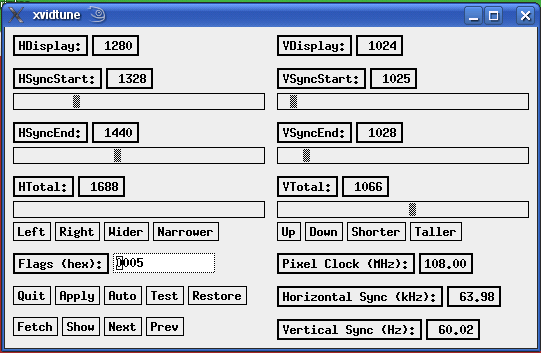 And after adjustment:  xvidtune How-to use: Using xvidtune Top Another Try Well things are going all to hell!! Bouncing around I lost some more notes AND my AC (air conditioner) went on the frits!! Oh well... it's only 115 today here in Phoenix. I did another install of SuSE 10.3. This time, in addition to that I fixed my display. As I mentioned above, it was always shifted to the Right and I had to use the monitor's buttons to manually fix it. Well, I found xvidtune and used it. Unfortunately, in order to get the settings to save, I had to do a FULL blown update(YOU) of 10.3. This contained the proper nvidia drivers, so all helped. However, (that word again) all is NOT well. AFTER the Full update my Quanta was missing, konqueror was missing and who knows what else was missing.!.! Such a disaster. Then I tried to find the konqueror in the Repositories to replace it AND it was NOT there. At least NOT the KDE 3 version. All that was there was the KDE4 stuff. So now I am going to try to re-load the SuSE 11.1 version again. IF I run into any problems I think I am just gona call it quits on Linux and stick with Windows. TopHopefully, the last SuSE Linux 11.1 re-load...(but I doubt it) Already have SuSE 10.3 loaded. Because it detects hardware that 11.1 didn't on the
install of it, I am going to Update 10.3 to 11.1. Well, we have a problem. The screen is shifted to the Right again. Have to see if I can fix it like the last time, with xvidtune. Nope. Once again, I can move it over with 4 clicks but it doesn't save annnnddd... even if I modify xorg.conf it doesn't fix it. Now, kupdateapplet came up and has 61 updates for me. In 10.3 when I got a lot of "updates" I lost some functionality. So I'm leary on a large amount of updates. BUT we will do it AND make sure I have the latest nvidia stuff. Arrrgghh!! During this massive update I got a Allllrighty Now!! Got the updates ANNDD... the display stayed fixed!! no more offset to the Right. AND konqueror is working AND Quanta is still there. Looking Good. Hmmmmmm... display didn't last through a Re-Start. Checked out the nvidia drivers and updated them. Did an End Session and the display stayed. Now need to do a re-Start and see if it stays. Ok. Looking Good again. It appears that we finally have the display fixed. I just re-booted into Windows and it looks ok also. Now we need to get VMware loaded up in Linux. TopI found this little Gem on the Web, once again looking for something else, BUT I wanted to share it cause it expresses my feelings almost exactly. The site can be found at: CompuClues Forum Bitzenbytes.com With openSUSE, there's an easier way. ...and here's where I get on my soapbox. 
To anyone reading this, I don't care what OS you use. Really. Use Windows. Use openSUSE. Use one of the *buntus. S'ok, really. Some folks seem to care. I'm not one of them. That said, I recommend openSUSE to everyone. Why? When you get down to it, all Linux distros (distributions) are essentially the same. They've got the Linux kernel. They've got the GNU utilities. They've got the same userland software, more or less (and if they don't, you can grab the source and compile it). Yup...all the same, except for a couple-three things:
There are other minor differences (and when you've gotten the hang of this stuff, a little, I'd urge you to poke around the /etc folder of a few different distro installs. Kinda like kicking the tires and peeking under the hood)...but there are more similarities than differences. I like openSUSE the most because of YaST, pure and simple. YaST stands for 'Yet another Setup Tool' and is essentially just that...the tool SuSE has given you to install and manage its distro. YaST also gives you a nice interface for its package manager, so installing software is easy too. So, we've got YaST. Let's use it. Open YaST. Give it the root password when prompted. Top Got VMware loaded Looked like it was gona be good until ... I tried to access other dirs. After lots of head scratchin' cussin' and moanin' I found that, once again, even though you load something during the install it doesn't neccessarily get started. Like apache2 that's what happened on the Sambo Server. I had to start it. Now that it is started I need to get my user name and password registered in the password file... or something like that. Ah, ha.... smbpasswd -a ctaylor then enter the password. Which must, or
should(can't remember which), be the same username and password as your user in Linux. If you have the same username
and password on everything it makes it easier on the system, yourself and the crooks.
Sound Not everything gets setup automatically in Linux ... yet. We have the differences between, [Simple, Fast and Easy trying to become Secure] vs [Complex, Hard to use and Secure trying to become Easy]. Back in the Early Days of Home PC's, with DOS and Windows 1.0, things were not all that easy either. But as time went on and sales increased, enterprising individuals on their own and through major companies all got together and created a Windows World. Mater of fact there was a time period when the PC's were very, very Windows Specific. If not the whole thing at least parts of it. Thats where the money was... and still is. BUT the manufacturers have slackened up on the Windows specific elements and have even been providing drivers for Linux. So, we Linux users are making some headway. Still have a long way to go, though. Which brings us to Sound and some forgetfulness. In my newest system, they detected the sound
system but forgot to enable it. I did but got choppy sound. The original setup and fixes are described in: Don't forget K3b, lame, k3b-codecs, libmad0 And it ain't over yet!! Whilst operatiing my Firefox browser I noticed that I wasn't getting any sound in Flash and YouTube. AFTER dumping pulseaudio completely, I was able to get the sounds in both ... again. Another item released a little to soon. Well this is the end... For the most part my PC machine has been restored. I know, and you do too, that there will be things that I will want to do ... and can't ... because of something that I forgot. If and when that happens I will try to remember to make a note of it in my WhatsLoaded doc. I still need to re-load Vista, Windows 7 and the latest openSuSE 11.2 but those will be covered in their own WebPages... cause that is what I happened to be doing when I caused this rucus!! TopTriple Boot Well, it appears that my notations and experiences on setting up the triple boot are going to
be contained in this file. This note is actually after the following scenarios. -But- another screw up. I just "updated"
my SuSE 11.1 and then re-booted. as required, cause the kernel was changed. Oooops... the grub being used for boot is actually in
the last Linux loaded, which was 11.2, and it doesn't know about the changes in 11.1!! I didn't pay proper attention to this
fact and now it can not find my 11.1 partition and I don't know the new name of the kernel. From fragmented memories and Web
searches I believe that I have to change the numeric portion to 2.6.27.29-0.1.1. I am allowed to edit the boot line so we will
try that. Can't hurt anymore than now. (By the way, I am creating this particular paragraph/note in Windows.)(now in Linux) I was
almost correct. Had to remove the last dot 1(.1). The actual name(s) were/are:
title openSUSE 11.1 - 2.6.27.29-0.1 (pae)
    root (hd0,5)
    kernel /boot/vmlinuz-2.6.27.29-0.1-pae root=/dev/disk/by-id/ata-WDC_WD3000JS-60PDB0_WD-WCAPD1266636-part6 resume=/dev/disk/by-id/ata-WDC_WD3000JS-60PDB0_WD-WCAPD1266636-part5 splash=silent showopts vga=0x31a
    initrd /boot/initrd-2.6.27.29-0.1-pae
Thanks to the Lord for opening my eyes to see this. New attempt at "fixing" the Partitions. The sda8 partition in the list below is my latest attempt at correcting the Partitions on my first drive. sda5, sda6 and sda7 are used for my current Linux SuSE 11.1. I wanted the sda8 to be an "Unallocated" portion of the drive. However, in the calculations by the systems, I had an unused portion of 462MB at the end of the Extended Partition. I tried to reduce the Extended Partition and add the unused portion to the Unallocated part. Let it suffice to say that the only way I could get back the unused portion was to create/reduce/expand a partition at the end of the Extended Partition. Whew... a tounge twister. Now then, in order to do what I want to do, I need to create a root, home and swap inside sda8... which should recreate it and make an sda9 and sda10. We'll see. dusty-tr2:/home/ctaylor # fdisk -l Disk /dev/sda: 300.0 GB, 300069052416 bytes 255 heads, 63 sectors/track, 36481 cylinders Units = cylinders of 16065 * 512 = 8225280 bytes Disk identifier: 0x70987098 Device Boot Start End Blocks Id System /dev/sda1 1 10199 81923436 7 HPFS/NTFS /dev/sda2 35529 36481 7654941 c W95 FAT32 (LBA) /dev/sda3 * 10200 29319 153581400 f W95 Ext'd (LBA) /dev/sda5 10200 10461 2104483+ 82 Linux swap / Solaris /dev/sda6 10462 15934 43961841 83 Linux /dev/sda7 15935 29260 107041063+ 83 Linux /dev/sda8 29261 35528 50347678+ 83 Linux Partition table entries are not in disk order Disk /dev/sdb: 300.0 GB, 300069052416 bytes 255 heads, 63 sectors/track, 36481 cylinders Units = cylinders of 16065 * 512 = 8225280 bytes Disk identifier: 0x03ce34a8 Device Boot Start End Blocks Id System /dev/sdb1 1 34443 276663366 7 HPFS/NTFS /dev/sdb2 34444 36481 16370235 f W95 Ext'd (LBA) /dev/sdb5 34444 36481 16370203+ b W95 FAT32 dusty-tr2:/home/ctaylor # Allllrighty now ... I could not deallocate sda8 via Partition Magic. The previous partitions are ext3 and it doesn't understand them. Kept getting unrecognized system error everytime I tried to delete the sda8 partition to make it empty. My first attempt at installing SuSE 11.2 in this manner was NOT successful. It wanted to use my SuSE 11.1 partitions. I used gparted to make it empty but I do believe that was futil. You can only have 4 physical partitions on a disc. For a Linux system you need three. A swap, root, and home. So, I must extend the Extened partition and then try the install. -BUT- we need a plan. I don't believe that it is going to let me have two swaps, two roots and two homes. Ok, with Partition Magic I created an Unformatted partition of the Unallocated space. Let's see what the installer thinks of that. Bumber!!! It keeps wanting to use the partitions from my SuSE 11.1. Now then, in doing my usual, searching the Web, I found this from Oldcpu in the openSuSE Forums. Notice: he's got the WinXP portion as a Primary AND the roots of both the Linux versions ALSO are Primary. This takes the first three of the 4 allowed physical partitions. The fourth Partition is an Extended one in which you can create others.(logical ones) Looks like that is the only way I am going to get a Dual Linux on the same HD. (Well, possibly not true...see below)
Well, I posed the question to the indiviuals on the openSuSE Forum and the answers I got back
tell me I should have been able to accomplish this, the triple boot, earlier if I had just kept my sda's straight. So,
we will try again. Using Gparted with a SystemRescueCD I exetened the Extended Partition and created Partitions for
another swap, root and home to be used by openSuSE 11.2
Disk /dev/sda: 300.0 GB, 300069052416 bytes
255 heads, 63 sectors/track, 36481 cylinders
Units = cylinders of 16065 * 512 = 8225280 bytes
Disk identifier: 0x70987098

Device    Boot      Start         End      Blocks   Id  System
/dev/sda1               1       10199    81923436    7  HPFS/NTFS             WinDrv C:
/dev/sda2           35529       36481     7654941    c  W95 FAT32 (LBA)       WinDrv Recovery
/dev/sda3   *       10200       35528   203455192+   f  W95 Ext'd (LBA)	      Extended Partition
/dev/sda5           10200       10461     2104483+  82  Linux swap / Solaris  openSuSE 11.1
/dev/sda6           10462       15934    43961841   83  Linux /               openSuSE 11.1
/dev/sda7           15935       29260   107041063+  83  Linux /home           openSuSE 11.1
/dev/sda8           29261       29526     2136613+  82  Linux swap / Solaris  openSuSE 11.2
/dev/sda9           29527       32251    21888531   83  Linux /               openSuSE 11.2
/dev/sda10          32252       35528    26322471   83  Linux /home           openSuSE 11.2
Top
Partition Managers GParted GParted is a GNOME partition editor for resizing, creating,
deleting, moving or copying partitions on a hard disk. You can also create a partition table and enable or disable
partition flags such as boot and hidden. April 13th, 2012 Well, things did NOT go well in our second recovery. The Partitioning was/is the biggest problem. There used to be ... and still are ... some Hard Drive Limitations on sizes. Depends on your OS and Software vintage. We have a mixture of "old" and "new". This without proper thought and planning can ... and does ... lead to trouble. Through trials and tribulations we have finally come to the fact that we need to use GParted -AND- redo our system one more time. Our "Recovery Partition" got mishandled by some of the things we tried ... not sure how much was our fault and how much was theirs. Makes no difference... we still gota redo the machine. Now time has been spent getting our New HP Laptop in shape to become the Main Machine for a while. We plan on putting Linux on this newest Laptop cause it has the room. Just need to get a good stable version. We think that openSuSE 11.4 might be our best bet for now. The 12.1 version is NOT working well... and the 12.2 is still in development throes. -BUT- one of the things that has to be performed first is PARTITIONING... and this Laptop has a humongous Hard Drive... 640GB!! So, we will experiment one more time with the Desktop BEFORE we mess with the Laptop. Gota have a good machine somewhere. Well, the gizmos site mentioned above talked about a "TestDisk" program and in its description it talked about repairing Partitions. Well, we could not get it to work... either cause of lack of understanding -or- our system is just that screwed up. ARRRGGG!!!! We are just gona byte the bullet and re-load it... the Desktop Machine. To many things going awry and wrong. A FULL Clean Re-Load / Re-Start is needed / desired. ARRGGGHH!!! Notice the date above???? ANNDD it was Friday!! Well, we screwed up again!! Forgot to save some things -BEFORE- destroying our System. One of them was our E-Mails... and addresses. Sometimes we hate computers... even when it is our own fault!!! TopPrinter Server & Printer PS110: This is a Netgear Printer Server. It naturally comes with
a disc providing software and drivers that will be needed. cp1700: This is a fine HP Printer. It also comes with a disc containing software and drivers. Refs: PS110 - cp1700 and My 7480 TopRouter & Switcher RT311: Netgear Router. This came with a disc -but- so far on this Re-Install and Re-Setup of my system I haven't had to load any of it. Both the Windows and Linux Systems have been working fine. So for now... we will not load the software. (if it ain't broke ... don't fix it) FS108: Netgear Switch. Sorta same here, 'cept I can't find a disc for it. Don't know right now if it came with one or not. So far nothing is needed anyway, on either Operating System. Top All Done
Top
|


 But ... it might have made
things worse. I had been thinking of redoing my System anyway ... but in a more controlled manner.
But ... it might have made
things worse. I had been thinking of redoing my System anyway ... but in a more controlled manner. The
The 
 ...hmmmmmm...
 occurred
to me that; "Now would be a good time to do an analyzation of my System Setup and HD usage."
I had done this when I first got my new
occurred
to me that; "Now would be a good time to do an analyzation of my System Setup and HD usage."
I had done this when I first got my new 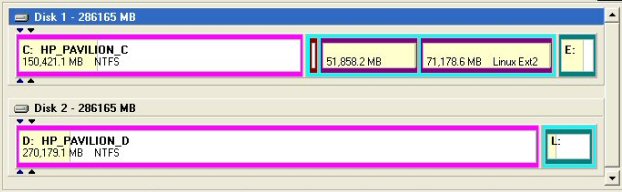
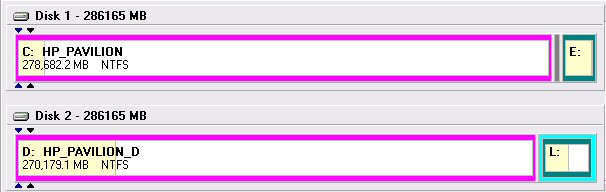



 Now then, I'm surprised that it looks like this. The Disc by ID is possibly leftover from the 11.1 attempt,
since they are empty. BUT I thought that the area was to be wiped and formatted when this 10.3 was loaded.
Final results according to PartitionMagic:
Now then, I'm surprised that it looks like this. The Disc by ID is possibly leftover from the 11.1 attempt,
since they are empty. BUT I thought that the area was to be wiped and formatted when this 10.3 was loaded.
Final results according to PartitionMagic: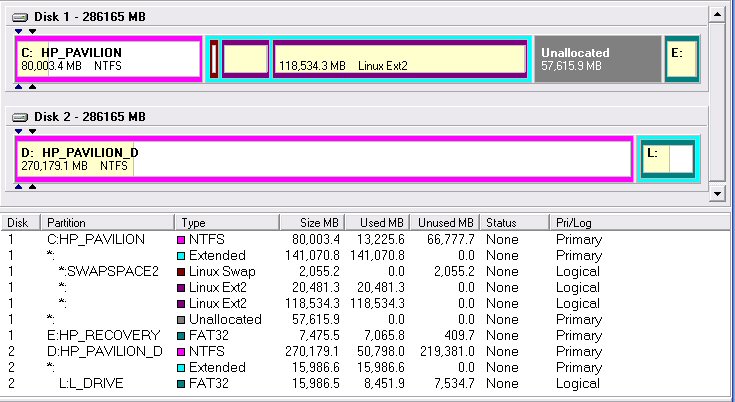 Doesn't matter. My database didn't work here in 10.3 either. Think I am just gona re-load up the 11.1 and be
done with it. In fact ... I may do
Doesn't matter. My database didn't work here in 10.3 either. Think I am just gona re-load up the 11.1 and be
done with it. In fact ... I may do 




